Contents
A sales call ends, and an account executive has another meeting soon. The rep must now update the CRM, write the follow-up, and prepare for the next conversation.
Sales automation was intended to reduce this burden. Nevertheless, much of it still depends on rigid rules, manual input, and disconnected applications. A reminder can prompt a follow-up. However, it cannot always understand the buyer's concern or what should happen next.
This is where AI sales automation changes the workflow. It uses buyer and opportunity data before recommending or completing the next activity. For an account executive, this may include preparing a buyer brief or rehearsing a conversation. It may also include analysing a call, drafting a follow-up, or retrieving a deal detail.
The objective is not to automate the entire sales process. It is to eliminate repetitive tasks while helping reps make better decisions when a deal's progress depends on them.
TL;DR: AI sales automation at a glance
- AI sales automation uses artificial intelligence to research, analyse, recommend, and complete routine sales activities.
- Unlike traditional automation, it can interpret unstructured data and adapt its output to the context of each transaction.
- Common use cases include prospect research, lead scoring, personalised outreach, meeting preparation, AI sales roleplay, call analysis, follow-up creation, CRM updates, and deal-risk detection.
- The right tool depends on the problem. Prospecting tools, engagement platforms, conversation intelligence software, CRMs, and AI assistants perform different jobs.
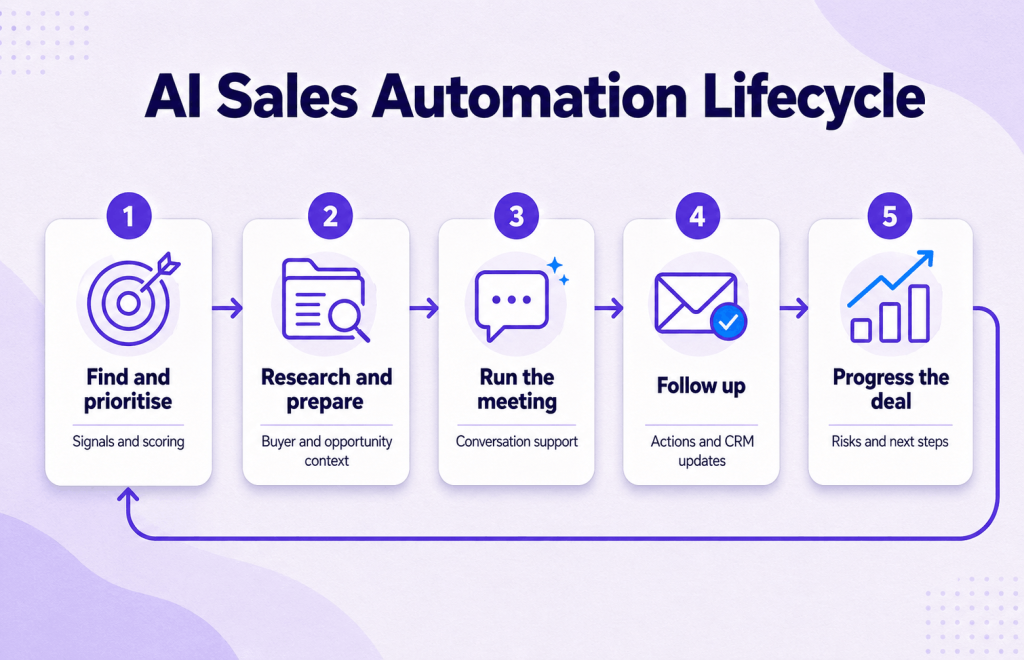
- AEs often face the largest gaps around meetings. They must prepare before the call, respond effectively during it, and convert the conversation into action afterward.
- Start with one painful workflow. Define a measurable outcome, add a human approval step, and expand only after the workflow proves effective.
What is AI sales automation?
A traditional workflow may send a follow-up email three days after a prospect opens the first message. In contrast, an AI-powered workflow can consider several factors before recommending the next action:
- The buyer's role
- Recent engagement
- Account context
- Previous conversations
- Likely intent
This matters because selling rarely occurs in a predictable order. Buyers raise unexpected objections, priorities change, and new stakeholders enter deals. Therefore, useful automation does more than run a timer or move a field.
An effective AI sales automation software combines three elements:
- Data access: It uses relevant CRM, calendar, email, meeting, and buyer information.
- Contextual understanding: It interprets what that data means for the current buyer or opportunity.
- Workflow action: It generates recommendations, completes tasks, or routes the rep to the next appropriate action.
AI sales automation vs. traditional sales automation
The terms are often used interchangeably, but they are not the same.
| Area | Traditional sales automation | AI sales automation |
|---|---|---|
| Logic | Uses predefined rules and triggers | Interprets context and patterns |
| Inputs | Mainly structured fields | Structured and unstructured data |
| Output | Repeats a predetermined action | Generates or recommends an adaptive action |
| Example | Send email two after three days | Draft a follow-up based on the call and buyer concerns |
| Best suited for | Stable, repetitive processes | Research-heavy and context-dependent work |
| Human role | Designs the rule | Reviews, guides, and handles judgment-heavy moments |
Traditional automation remains valuable. A reliable rule can efficiently assign leads or send reminders. Meanwhile, AI helps with tasks that require context.
Therefore, most sales automation systems use rules for predictable workflows and AI for areas with too many variables for fixed logic.
How does AI sales automation work?
A typical AI sales system follows a simple loop:
1. It collects relevant sales data
The system collects data from tools such as the CRM, calendar, call recorder, email platform, and product knowledge base.
2. It builds context
AI identifies relevant buyer information, including role, communication style, account history, objections, commitments, competitors, and unresolved questions.
3. It produces an insight or action
Depending on the application, the system may score leads, create briefings, simulate buyers, suggest responses, analyse meetings, draft emails, or update records.
4. The rep reviews or applies the output
Reps should remain involved where nuance is required. They can verify the output, add missing context, and decide how to proceed.
5. The workflow learns from new activity
Every meeting, email, stage change, and rep decision adds context. As a result, the system can create more relevant outputs when that context remains connected to later customer interactions.
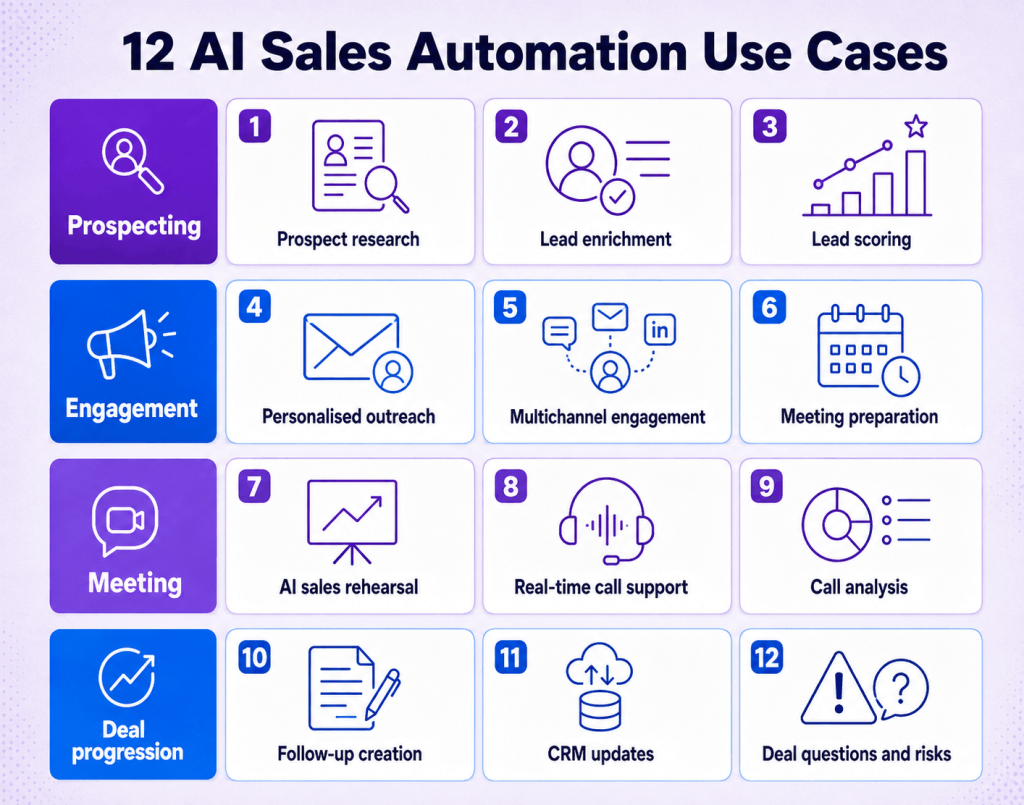
12 AI sales automation use cases across the sales process
AI can support most funnel stages. However, over-reliance on automated processes creates risks. The following examples show where AI for sales automation can be beneficial.
1. Account and prospect research
AI can gather company information, buyer details, recent news, and potential business priorities. As a result, reps spend less time moving between browser tabs before outreach or meetings.
While the rep should verify critical claims, a well-structured research brief provides a useful starting point.
2. Lead enrichment
AI can populate missing firmographic, demographic, and behavioural information in existing lead records. Better information helps teams route leads appropriately and personalise communication.
The process depends on accurate source information. Poor-quality or outdated data makes the problem worse, faster.
3. Predictive lead scoring and prioritisation
Using historical conversion rates, fit scores, engagement metrics, and buying signals, AI can identify which leads may warrant attention sooner.
The goal is not to predict whether a deal will close. Instead, it helps teams allocate limited time to stronger opportunities.
4. Personalised sales outreach
Generative AI can create emails and LinkedIn messages using a prospect's role, company, pain points, and previous engagement. This makes personalisation easier to scale.
Volume does not equal relevance. Sending a weak message quickly does not make it strong. Reps should review initial outreach and messages for high-priority accounts.
5. Multichannel sales engagement
A sales automation platform can coordinate email, calls, social media, and task reminders. AI can also recommend a channel or timing based on prospect engagement.
This capability is especially helpful for SDRs. For AEs, it can support deal follow-up without turning every interaction into a generic sequence.
6. Buyer and meeting preparation
Prior to meetings, AI can integrate account research, buyer information, meeting history, and opportunity context into a concise brief for representatives.
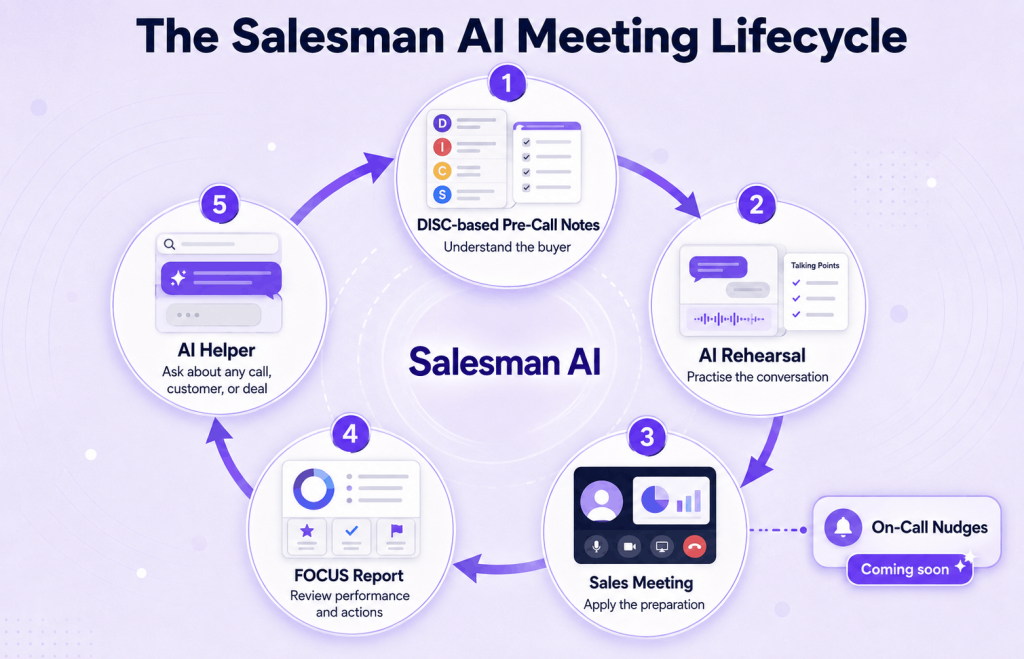
Salesman AI focuses on the rep experience, not only task automation. Its DISC-based Pre-Call Notes help AEs understand how buyers may prefer to communicate and how to approach the conversation. The objective is not to stereotype buyers. Instead, it provides a thoughtful foundation for the meeting.
7. AI sales roleplay
Meeting preparation tells AEs what to anticipate. AI roleplay helps them practise how to respond.
By simulating discussions with prospective buyers, AI sales roleplay helps reps sharpen objection responses, improve discovery questions, and refine value explanations. This extends AI beyond task completion into skill development.
8. Real-time support during meetings
An AI sales call assistant can identify questions, objections, competitor references, or missed topics during a meeting. It can then surface relevant information or a private prompt.
However, too many prompts can distract the rep from the buyer. Therefore, real-time assistance should be timely, discreet, and limited to insights that improve the conversation.
9. Call analysis and conversation intelligence
After meetings, AI can transcribe calls and convert them into structured sales intelligence. This includes objections, needs, sentiment, questions, commitments, and next steps.
AI-based sales coaching becomes more useful when it explains how reps can improve, instead of providing only a transcript or talk-time metric. Salesman AI's FOCUS report uses a structured framework to help AEs understand the conversation and the actions required afterward.
10. Creating follow-ups
AI can generate follow-up emails using the specifics of the conversation, including commitments, requested resources, unanswered questions, and agreed next steps.
Reps should still review drafts before sending them. A small customer-facing error can negate the efficiency gained through automation.
11. CRM data entry and opportunity updates
Manual CRM updates are monotonous and often delayed. AI can extract relevant fields from emails and calls, then suggest updates for contacts, notes, next steps, and opportunity stages.
However, teams should establish approval rules for high-impact fields such as deal stage, forecast category, and close date.
12. Deal questions, risk detection, and next actions
When a salesperson must follow up on details from several meetings and buyers, they need a quick way to retrieve previous information. An AI sales assistant can answer questions such as:
- What issues are still open?
- What did the buyer say about timing?
- Who else is involved in the buying decision?
- What did you promise to send?
- What do you need to confirm at the next meeting?
Salesman AI's AI Helper uses chat and voice to answer questions about a call, customer, or deal. Because buyer, meeting, and opportunity context remains connected, reps can use prior conversations to plan the next step.
Types of AI sales automation tools
Search results for the best tools often mix related but different products. This is partly because many tools have overlapping capabilities.
| Tool category | Primary job | Typical use cases | Best fit |
|---|---|---|---|
| Prospecting and data tools | Find and enrich potential buyers | Account research, contact data, enrichment | SDR and outbound teams |
| Sales engagement platforms | Coordinate outreach workflows | Sequences, tasks, multichannel engagement | High-volume prospecting teams |
| CRM and pipeline platforms | Store and manage customer records | Lead routing, pipeline management, forecasting | Sales and RevOps teams |
| Conversation intelligence tools | Record and analyse meetings | Transcripts, summaries, call review | Managers and enablement teams |
| AI sales coaching tools | Improve rep execution | Preparation, roleplay, call feedback | AEs and sales enablement teams |
| AI sales assistants and copilots | Support contextual sales work | Research, recommendations, follow-up, deal Q&A | Reps managing active opportunities |
Where Salesman AI fits in the AI sales automation stack
Many automated sales tools concentrate on generating more leads, sending more outreach, or giving managers greater visibility. Those jobs matter. However, they do not fully address what happens after an AE gets the meeting.
Salesman AI is a rep-first AI sales platform for account executives. It connects the work around a meeting instead of treating preparation, coaching, and follow-up as separate activities.
| Meeting stage | Salesman AI capability | What it helps the rep do |
|---|---|---|
| Before the call | DISC-based Pre-Call Notes | Understand buyer context and prepare an appropriate approach |
| Before the call | AI Rehearsal | Practise discovery, objections, and responses with a customer clone |
| During the call | On-Call Nudges, coming soon | Receive discreet, contextual prompts during the conversation |
| After the call | FOCUS report | Review the meeting, performance, risks, and next actions |
| Across calls and deals | AI Helper | Ask questions through chat or voice using connected context |
This creates a continuous loop: prepare, rehearse, perform, review, and use what was learned in the next interaction.
That is the main difference between recording a call and automating the sales work around it. One stores the conversation. The other helps the rep use it.
Benefits of AI-powered sales automation
The value of AI-powered sales automation depends on the workflow. Teams generally use it for five reasons.
More time for customer-facing work
Research, note-taking, CRM management, and follow-up activities consume time without replacing the need for a real conversation. Automating some of this work gives reps more time to prepare and engage with buyers.
More consistent sales execution
Automation can ensure that each rep receives a briefing, captures next steps, and follows a repeatable review process. This creates consistency without forcing every buyer conversation into the same script.
Better use of buyer context
Buyer meetings contain valuable information about needs, objections, decision criteria, and commitments. AI can organise this information for use after the meeting.
More efficient follow-up
Deals often lose momentum between a meeting and the next action. Creating draft follow-ups and capturing buyer commitments quickly helps the rep keep the deal moving.
More relevant coaching
Generalised training has limits. AI coaching can use each rep's actual meeting context to create more targeted practice and feedback.
Risks and limitations of AI sales automation
AI can improve a process. However, it can also magnify that process's weaknesses when scaled. Teams should consider the following risks before expanding automation.
Poor input data
Automated messaging based on incomplete or poorly enriched CRM records will perform badly. Teams must ensure adequate data quality before scaling.
Generic messaging
Buyers easily notice shallow personalisation. Therefore, strategic accounts, first-touch outreach, and sensitive communication require human review.
Disconnected tools
Adding several AI tools can increase copying, tool switching, and duplicate data. Integration quality matters as much as individual feature quality.
Over-automation
Automated systems cannot replace relationship building, negotiation, empathy, or complex judgment. The best systems augment the rep's skills instead of trying to replace them.
Privacy, security, and consent
Sales calls and CRM records often contain private customer information. Teams must assess access controls, data retention, recording consent, and local regulations before deployment.
Incorrect output
Generated content can contain inaccuracies. Teams need review checkpoints for critical claims, customer messages, forecasts, and CRM changes.
How to choose an AI sales automation platform
Choose a platform by matching it to the specific workflow challenge your team has identified. Consider the following criteria before narrowing your shortlist.
Identify the real bottleneck
What prevents the team from generating pipeline, preparing for meetings, improving calls, updating the CRM, or progressing active deals? Each issue suggests a different tool category.
Determine the quality of context
How much information can the system access, and how does it connect that information? A useful AI sales assistant should not rely only on a call transcript when buyer and deal history also matter.
Assess workflow alignment
The software should appear where reps already perform their daily tasks. Otherwise, even high-quality outputs may go unused.
Identify human approval points
Decide which actions can happen automatically and which require review. For example, the system can draft a follow-up, while the rep approves it before sending.
Test realistic workflows
During a trial, test a difficult buyer, an incomplete CRM record, a complex objection, and a deal with multiple stakeholders. Real workflows reveal weaknesses that polished demos may hide.
Review integrations and data controls
Confirm the required calendar, CRM, meeting, email, and identity integrations. Also review permissions, retention, and administrative controls.
Verify rep engagement and business value
Usage matters only when it improves performance. Monitor whether the team completes the workflow successfully, not how often they click an AI button.
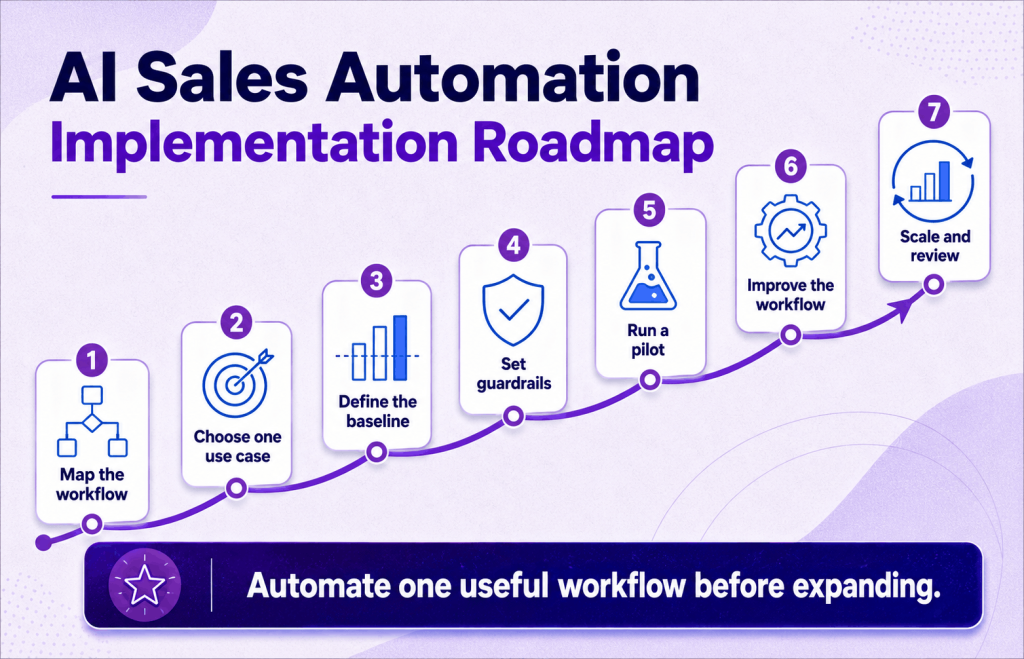
A practical AI sales automation implementation plan
Teams do not need to automate the entire sales process at once. A targeted rollout is easier to measure and improve.
Step 1: Map the current process
Write down each manual step, tool, handoff, and delay. Ask reps where they lose time and where relevant information disappears.
Step 2: Choose one high-friction use case
Select a frequent activity with a visible cost, such as meeting preparation, follow-up creation, or CRM note capture.
Step 3: Establish a baseline
Measure the current process before implementing new technology. Otherwise, you will not know whether the tool improved it.
Step 4: Establish guardrails
Define the permitted data, approval rules, escalation procedures, and ownership for each part of the workflow.
Step 5: Run a pilot
Use a test group and real opportunities. Gather examples of useful, poor, and incorrect outputs.
Step 6: Adjust the workflow
Based on the pilot, adjust prompts, fields, integrations, and approval points.
Step 7: Expand and continue monitoring
Expand only after the use case works as intended. Continue reviewing it as the sales process, product, and buyer expectations evolve.
Metrics to track for AI sales automation
Choose metrics that match the automated workflow.
| Workflow | Useful efficiency metric | Useful outcome metric |
|---|---|---|
| Buyer research | Preparation time per meeting | Rep use of relevant buyer context |
| Outreach | Drafting time and manual touches | Positive reply or qualified-meeting rate |
| AI rehearsal | Practice completion | Improvement in targeted sales behaviours |
| Call analysis | Review time | Coaching action completed |
| Follow-up | Time from meeting to follow-up | Next-step completion rate |
| CRM automation | Manual entry time | Record completeness and accuracy |
| Deal support | Time to retrieve information | Risks resolved and next actions completed |
Frequently asked questions about AI sales automation
What is AI sales automation?
It uses artificial intelligence to research, analyse, recommend, or perform repetitive sales activities. Examples include lead enrichment, meeting preparation, personalised outreach, call analysis, follow-up drafting, CRM updates, and deal-risk detection.
How is AI used in sales automation?
AI processes CRM data, emails, meeting transcripts, buyer information, and engagement signals. It uses this context to prioritise leads, prepare briefings, draft follow-ups, and suggest next steps.
What are the best AI sales automation tools?
The answer depends on the workflow. Prospecting platforms support data and outreach. Engagement tools coordinate sequences, CRMs manage records and pipelines, and conversation intelligence tools analyse calls. Meanwhile, AI sales assistants support reps during active meetings and deals.
Can AI automate the entire sales process?
AI can automate many repetitive and research-heavy tasks. However, relationship building, discovery, negotiation, strategic decisions, and sensitive customer communication still require human judgment.
How is an AI sales assistant different from a sales automation tool?
Sales automation tools usually execute defined workflows, such as sequences or CRM updates. An AI sales assistant can also interpret context, answer questions, generate recommendations, and support reps during less predictable tasks.
How can AI help account executives?
AI can help AEs research buyers, prepare for meetings, practise conversations, review calls, create follow-ups, retrieve deal information, and identify next steps. The most useful tools keep context connected across these stages.
Will AI sales automation replace sales representatives?
AI is better suited to replacing repetitive tasks than the complete role of a sales representative. Complex B2B selling still requires trust, judgment, empathy, negotiation, and an understanding of organisational dynamics.
How should a sales team start using AI automation?
Start with one frequent, measurable problem. Establish a baseline, define human approval points, and pilot the workflow in real scenarios. Expand only after the output is accurate and useful.
AI sales automation should make reps better, not merely busier
Sales teams do not want another tool that creates more work or content for reps to manage. They want automation that removes repetitive tasks, saves time, and helps reps interact with customers at the right moments.
This is especially important around sales meetings. That is where research becomes conversation, buyer signals become decisions, and promises become next steps. When these stages sit in separate tools, valuable context can disappear between them.
Salesman AI connects preparation, rehearsal, post-call analysis, and deal support in one rep-first workflow. It helps account executives use AI before, during, and after each conversation, with one goal: turn more meetings into won deals.