Contents
As an account executive, you are likely using AI today to summarise calls, draft emails or research accounts. But the larger question is whether these individual outputs help you close a live deal.
A useful AI sales assistant tool should do more than remove administrative tasks from your day. It should understand the buyer, meeting and opportunity so you can prepare, respond and decide what to do next. A general assistant can create written content. However, a dedicated sales assistant should improve the quality of the next action you take on a deal.
This article reviews 12 different tools from an account executive’s point of view. It explains each tool’s strengths and weaknesses, what it cannot replace and which part of your workflow it supports.
TL;DR: the best AI sales assistant tools by use case
| Tool | Best for | Main workflow owned | Important limitation |
|---|---|---|---|
| Salesman AI | AEs managing complex meetings and deals | Preparation, buyer-specific rehearsal and post-call action | Not a CRM or prospecting database |
| Microsoft Sales agent | Microsoft 365 and Dynamics users | CRM context inside Outlook, Teams and Microsoft 365 | Best value depends on the Microsoft ecosystem |
| Salesforce Agentforce | Salesforce-centred enterprises | CRM-native agents and sales workflows | Requires Salesforce data and administration |
| HubSpot Breeze | Teams already running HubSpot | CRM assistance, prospecting and deal tasks | Broad platform rather than a specialist AE coach |
| Gong | Revenue teams needing interaction intelligence | Conversation, deal, coaching and forecast insight | Larger, manager-led deployment |
| Salesloft | Reps who need a prioritised daily workflow | Buyer signals, next actions and engagement | More platform than personal meeting assistant |
| Outreach | Structured prospecting and deal execution | Engagement, live guidance and pipeline workflows | Broad implementation with several modules |
| Avoma | Meeting capture with coaching and intelligence | Scheduling, notes, CRM updates and call analysis | Wider meeting use cases can dilute AE specialisation |
| Sybill | Automated CRM updates and follow-up | Briefs, summaries, CRM autofill and deal questions | Less focused on rehearsal before a buyer call |
| Attention | Real-time coaching and custom CRM capture | Live guidance, data extraction and workflows | Best fit depends on CRM and workflow configuration |
| Lavender | Improving sales emails | Email drafting, scoring and coaching | Does not manage the full opportunity lifecycle |
| Apollo | Prospecting data and outbound execution | Research, contact data, scoring and outreach | Strongest before the opportunity becomes complex |
What is an AI sales assistant?
A seller uses an AI sales assistant to complete or improve specific sales tasks. For example, that could involve researching accounts, preparing for meetings, creating emails, supporting calls, taking notes or updating a customer relationship management (CRM) system. It could also provide coaching and recommend follow-up actions.
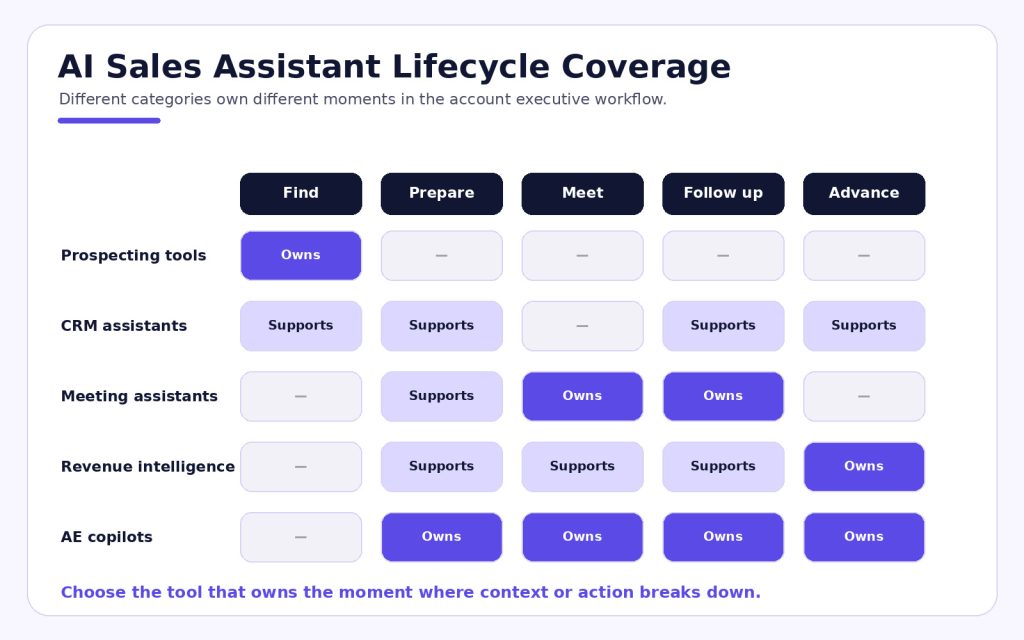
However, this category includes several different types of products:
- Generic AI assistants create or summarise content based on a user’s prompt.
- Meeting assistants record, transcribe and summarise conversations.
- CRM assistants use account and opportunity data found inside a CRM.
- Sales engagement assistants provide guidance on sequencing and prioritising outreach.
- AE copilots connect meeting context with deal execution before and after a call.
The issue arises when a team purchases one type of product and expects every other category to be covered. It also occurs when a prospecting tool is expected to understand and act on a late-stage buyer commitment. A useful tool can still be the wrong tool for the job. This is why teams should define which parts of AI sales automation they want a product to own.
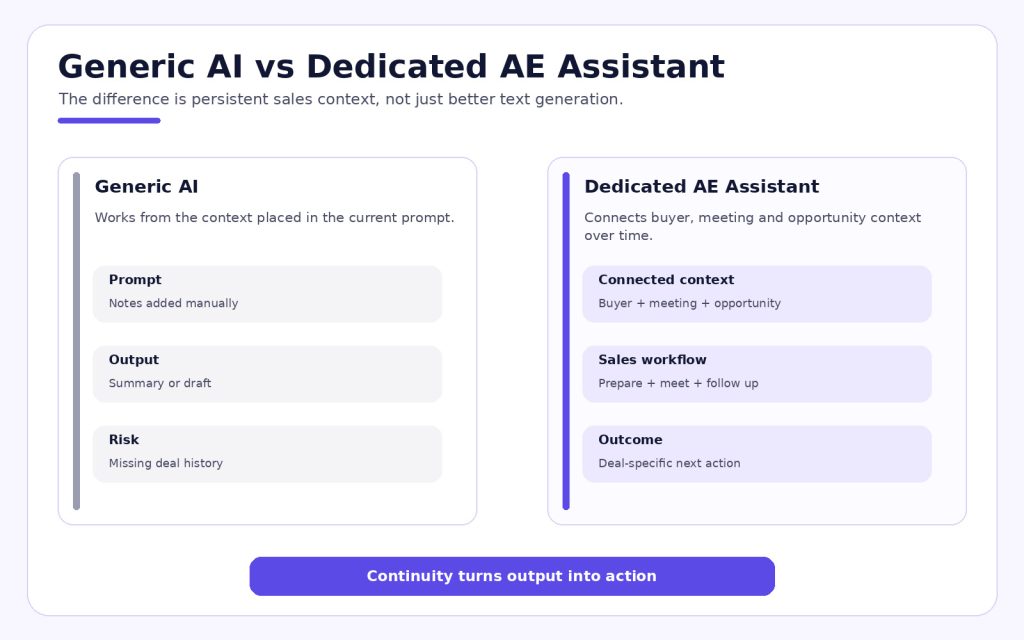
Dedicated AE assistant vs generic AI
A generic AI may help with individual tasks. However, you must give it the relevant background, often by pasting notes into the prompt. The output will only be as useful as the history and context you provide.
A dedicated sales assistant should keep track of the relationships between an account, a buyer, a meeting and an opportunity. It should understand what changed since the previous conversation and who objected to what. Finally, it should distinguish a buyer commitment from a seller suggestion.
| Question | Generic AI | Dedicated AE assistant |
|---|---|---|
| Where does context come from? | The prompt or uploaded document | Connected meetings, buyers and opportunity history |
| What does it optimise? | The requested output | Progress in a specific sales workflow |
| Does it understand the deal over time? | Only when context is supplied again | It should preserve or retrieve deal history |
| Can it support preparation? | It produces generic research or questions | It uses buyer and opportunity context |
| Can it improve judgement? | It offers broad suggestions | It surfaces evidence, gaps, blockers and commitments |
| What is the main risk? | Confident output from incomplete context | Poor integration or weak sales-specific analysis |
Continuity matters more than novelty for an AE. Clever email drafts are helpful, but understanding why a buyer has not agreed to the next step is more valuable.
How we evaluated these AI sales assistant tools
Each tool was compared against seven questions:
- Does it help before, during or after a customer conversation?
- Does it use buyer and opportunity information, not just a transcript?
- Can the salesperson act on the output without rebuilding the reasoning?
- Does it reduce administrative work?
- Does it fit naturally into CRM, email and meeting workflows?
- Is the primary user a rep, manager or operations team?
- Which important sales tasks remain outside the product?
No tool was ranked by the number of AI features advertised. Instead, every recommendation reflects the job the product performs best.
The 12 best AI sales assistant tools for AEs
1. Salesman AI: best dedicated assistant for complex AE conversations
Salesman AI was developed specifically for account executives with existing meetings. Its goal is to help turn those meetings into revenue. Unlike a general sales tool, Salesman AI connects buyers, meetings and opportunities.
Before calls, Pre-Call Notes provide information about the buyer’s priorities, likely concerns and relevant deal context. AI Rehearsal also lets the AE practise against a buyer-specific customer clone.
After the meeting, the FOCUS report organises blockers, stakeholders, qualification gaps and commitments. AI Helper then allows the AE to ask questions about the meeting through voice or chat. The same opportunity context remains connected before and after the conversation.
Best for: AEs who need their preparation, practice and post-call actions in one place.
Limitation: The system works best alongside your current CRM, engagement platform and prospect database.
Verdict: Pick Salesman AI if the biggest challenge is handling booked meetings well and moving the resulting deals forward.
2. Microsoft Sales agent: best for Microsoft 365 workflows
Microsoft Sales agent adds sales functionality to existing Microsoft 365 applications, including Outlook and Teams, through Microsoft 365 Copilot. It connects with Dynamics 365 Sales and supported CRM systems. As a result, reps can prepare for meetings, review client history and follow up inside the applications they already use.
This provides a closer-to-workflow experience. Users who spend most of their time in Microsoft 365 can identify sales items that need attention without leaving their primary toolset.
Best for: Large enterprise organisations where Microsoft 365 and Dynamics 365 are already implemented and adopted.
Limitation: Its effectiveness depends heavily on the quality of your CRM data and the health of your Microsoft 365 implementation.
Verdict: It is a solid companion when sales and productivity workflows already run through Microsoft applications.
3. Salesforce Agentforce: best CRM-native AI assistant
Salesforce Agentforce for Sales provides assistance with prospecting, opportunity research, prospect engagement and coaching. Because it is part of Salesforce, it can use CRM data, flows and permissions to govern how it operates.
This is a good choice for organisations that want AI actions to run inside their Salesforce architecture. It is less about adding a low-cost rep tool and more about expanding the CRM into a platform for agent activity.
Best for: Salesforce customers with mature data and administration.
Limitation: Setup, governance and usage may be more involved than with a single-purpose assistant.
Verdict: Use it if Salesforce is at the centre of your sales process and AI must operate inside the same system.
4. HubSpot Breeze: best for growing teams using HubSpot
HubSpot Sales Hub and Breeze integrate prospecting, meeting preparation, content creation and deal support with the CRM. Breeze Assistant can summarise CRM records, answer users’ questions and help complete tasks across HubSpot.
The benefit is having a broad set of functions inside one relatively unified customer platform. Therefore, smaller and mid-sized teams can keep AI close to their CRM instead of building a stack of specialised tools.
Best for: Teams that want AI-powered assistance inside an accessible CRM platform.
Limitation: The assistant supports sales, marketing and service workflows. Therefore, it was not developed solely around complex AE conversations.
Verdict: It is a sensible choice if HubSpot already holds your customer data and daily sales activity.
5. Gong: best for conversation and revenue intelligence
Gong captures customer conversations and uses that information across conversation intelligence, coaching, deal review and forecasting. In addition, its Revenue Graph connects calls, emails, meetings, CRM records and other related signals.
Therefore, leaders and reps can work from a common evidence base. This is especially helpful when a company needs visibility across many sellers and opportunities, rather than assistance for one rep alone.
Best for: Organisations with large revenue teams that need conversation data for coaching, pipeline and forecast decisions.
Limitation: Deployment is typically broader and more manager-driven than a focused AE copilot.
Verdict: Select Gong when organisation-wide revenue visibility matters as much as individual rep assistance.
6. Salesloft: best for prioritising the seller's day
Salesloft Rhythm converts buyer and account signals into a prioritised workflow. The wider Salesloft platform also includes Cadence, Conversations, Deals and Forecast.
For an AE, the most useful question is often, “What should I do first?” Rhythm helps answer that question across prospecting and active opportunities.
Best for: Full-cycle sales professionals who work within a defined revenue workflow.
Limitation: A team seeking only meeting preparation or call review may be buying more platform than it needs.
Verdict: It is strong when the primary need is coordinating buyer signals and engagement tasks.
7. Outreach: best for sales execution and structured engagement
Outreach combines sales engagement, deal guidance and forecasting. Kaia provides live and post-call intelligence. Its conversational AI experiences also allow reps to retrieve account context and take action across the platform.
The strength of Outreach is executing a defined sales process. Teams can connect Outreach activity with opportunity work instead of treating sequences and deals as separate systems.
Best for: Revenue organisations seeking engagement, deal execution and forecasting in one platform.
Limitation: Because Outreach has several modules, it requires clear implementation ownership and thoughtful process design.
Verdict: It provides a broad assistant environment for teams standardising their selling motion in Outreach.
8. Avoma: best all-round meeting assistant
Avoma handles scheduling, recording, transcription, summaries, CRM updates, coaching and revenue intelligence. It supports sales teams as well as other meeting-focused functions.
This versatility is beneficial when a business needs one meeting layer across departments. For AEs, it reduces manual note-taking and makes conversations easier to review.
Best for: Teams that need meeting capture and analysis with sales intelligence capabilities.
Limitation: Its meeting scope is wider than that of a product focused solely on the AE opportunity workflow.
Verdict: Use Avoma when meeting capture and analysis are the top priority.
9. Sybill: best for CRM autofill and follow-up
Sybill uses call records, email communications and CRM data to create pre-meeting briefs, meeting summaries, follow-up messages and CRM updates. In addition, reps can ask about deal status using natural language.
Sybill is strongest when administrative work starts as soon as a meeting ends. It converts the conversation into structured output without requiring the rep to recreate every field.
Best for: AEs who lose time to CRM updates and post-call follow-up.
Limitation: Buyer-specific rehearsal is not the product’s primary workflow.
Verdict: Sybill is useful when accurate follow-up and CRM hygiene are the priority.
10. Attention: best for real-time coaching and custom data capture
Attention combines real-time sales coaching, CRM automation and configurable workflows. Its AI can capture designated information from conversations, identify potential risks and support reps during calls.
This may help businesses with defined methodologies or compliance standards that require consistent CRM documentation.
Best for: Teams that want live guidance and customisable call-to-CRM workflows.
Limitation: Results depend heavily on how the product is configured and integrated with the existing sales process.
Verdict: Consider Attention when the business needs specific conversation evidence captured consistently at scale.
11. Lavender: best AI assistant for sales emails
Lavender specialises in improving email performance through drafting, personalisation, scoring and sales-message coaching inside the rep’s inbox.
Lavender’s narrow focus can be an advantage when outbound email quality is the issue. The rep receives feedback while writing instead of waiting for a manager to review each email.
Best for: SDRs and AEs seeking better prospecting and follow-up emails.
Limitation: Lavender does not own meetings, deal inspection or overall opportunity strategy.
Verdict: Use Lavender when email coaching is the specific need. Do not treat it as a replacement for a broader sales assistant.
12. Apollo: best for prospecting data and outbound assistance
Apollo brings together B2B data, contact research, scoring, sequencing and AI-assisted outreach. It enables sellers to identify and contact potential buyers in one platform, making outbound activity easier to execute.
Apollo is strongest in the early stages of the sales process. This is particularly useful for account executives who self-source pipeline or work without a full SDR team.
Best for: Organisations with prospecting-led sales models that require both data and outbound engagement.
Limitation: Although Apollo can support buyer engagement, late-stage deal coaching and buyer-conversation preparation are not its main specialities.
Verdict: Use Apollo if identifying and engaging buyers is the primary constraint on your sales organisation.
Which AI sales assistant should you choose?
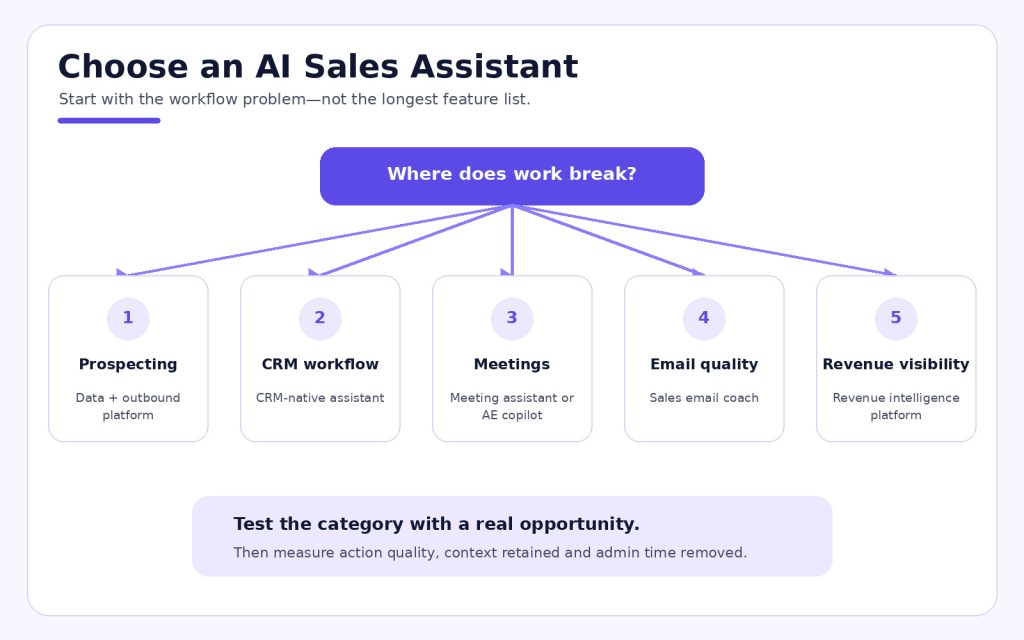
Start with the process you are struggling with now:
- Use Salesman AI if AEs require better preparation, practice and post-call deal actions.
- Use Microsoft Sales agent, Salesforce Agentforce or HubSpot Breeze if the CRM should control the assistant.
- Use Gong if you need interaction evidence across coaching, pipeline and forecasting.
- Use Salesloft or Outreach if prioritised engagement and sales execution are the main requirements.
- Use Avoma, Sybill or Attention for meeting capture, CRM automation or real-time call assistance.
- Use Lavender for email coaching.
- Use Apollo for prospecting data and outbound execution.
However, you may need more than one category. Each additional product must have a clear role. Two products that create similar summaries do not create twice the value. They may simply create another output for the AE to review.
A five-step buying checklist for AEs and sales leaders
1. Find the lost moment
Identify where the process breaks down. It may happen before the call, during an objection, after the meeting or before a deal review.
2. Use a live opportunity
Use an active deal involving several stakeholders and previous meetings. A clean demo account is unlikely to show whether the tool preserves messy, evolving context.
3. Review the output, not just the label
Review the actual summary, coaching prompt, CRM update or next-step recommendation. Can an AE use it immediately without rebuilding the reasoning?
4. Document system boundaries
Identify which systems own CRM data, engagement, meeting intelligence and deal activity. Then define how those systems communicate with one another.
5. Track seller behaviour
Track usage, preparation completion, CRM entry quality, buyer-confirmed next steps and administrative time. Do not evaluate success solely by the number of summaries the tool generates.
Frequently asked questions
What is the best AI sales assistant for account executives?
It depends on what you want to improve. Salesman AI was developed around the AE meeting and opportunity lifecycle. If your existing CRM ecosystem should control data and activity, a CRM-native assistant may be better suited to the wider team workflow.
Can ChatGPT replace a dedicated sales assistant?
ChatGPT can assist with research, drafting and reasoning if you provide the right context. A dedicated sales assistant adds connected sales data, repeatable workflows, permissions and integrations. The difference is not just the model; it is the context and action layer around it.
Is an AI meeting assistant the same as a sales assistant?
No. A meeting assistant usually records, transcribes and summarises. A sales assistant may use meeting data, but it should also support preparation, CRM updates, coaching, qualification or next-step decisions.
Should a sales assistant replace your CRM?
Generally, no. The CRM should remain the system of record for accounts, contacts and opportunities. The assistant should help the rep understand or update that information instead of creating another disconnected source of truth.
How should a team pilot a sales assistant?
Select a defined group of reps, a real workflow and a small set of measurable outcomes. Pilot the assistant across live opportunities and more than one customer meeting. Then compare both time saved and the quality of the sales actions taken.
Give the AE enough context to use
AI is easy to add to a sales stack. Developing useful assistance is much harder. To succeed, the tool must understand the moment, return evidence the AE trusts and make the next step easier.
That is what Salesman AI is designed to do. It connects meeting preparation, buyer-specific rehearsal, conversation intelligence and post-call deal support around the same opportunity.