Contents
The process of choosing a CRM can begin by looking at the features that matter to your organisation. However, this is only the beginning. The hardest part is making sure that the sales team will use the system and keep it current.
A good CRM system should allow your team to effectively organise accounts, manage opportunities and maintain a consistent view of the pipeline. However, the quality of the rep's daily workflow matters as much as the feature list. CRM systems vary greatly in complexity, workflow design, communication, automation and implementation effort.
What works well for one organisation may be too complex or cumbersome for another.
In our comparison of 11 examples of the best CRM software, we used current official product and pricing information from each vendor. Our focus was on legitimate sales scenarios, realistic limitations and the teams that would benefit most from each option.
TL;DR: the best CRM tools by use case
| CRM tool | Best for | Pricing approach |
|---|---|---|
| Salesforce Sales Cloud | Large enterprise sales organisations | Paid editions |
| HubSpot CRM | Connected sales, marketing and service teams | Free CRM; paid hubs and suites |
| Pipedrive | Visual pipeline management | Public tiered pricing |
| Zoho CRM | Cost-conscious teams that need customisation | Free for up to three users; paid editions |
| Freshsales | SMB and mid-market sales automation | Free plan; paid plans from $9 per user/month |
| Close | Outbound calling, email and SMS | Paid plans from $9 per user/month, billed annually |
| monday CRM | Flexible, visual workflows | Paid plans from $10 per user/month, billed annually |
| Copper | Google Workspace-centric teams | Paid plans from $23 per user/month, billed annually |
| Insightly | Connecting sales with project delivery | Paid plans from $29 per user/month, billed annually |
| Attio | Startups seeking a flexible data model | Free plan; paid plans from $29 per user/month, billed annually |
| Creatio | No-code CRM workflows | Composable pricing |
What is a CRM tool?
An organisation's customer relationship management (CRM) tool stores and organises relevant information about prospects, customers, accounts and current sales opportunities. Sales teams can use one shared system to manage the relationship from initial contact through the close and, for many organisations, after the sale.
Some common features associated with CRMs are listed below:
- Manage contacts and accounts.
- Track leads and opportunities.
- Configure custom sales pipelines and stages.
- Create tasks, activities and reminders.
- Integrate email and calendars.
- Automate workflows.
- Generate forecasts and reports.
- Set permissions and data controls.
- Connect to other sales applications.
A CRM provides a primary system-of-record function. It shows the sales team which accounts and opportunities exist in each territory. It also identifies ownership and the current pipeline stage. If this information is incomplete or outdated, the reports built on it will be unreliable.
How we evaluated these CRM platforms
We used the following categories to evaluate every product:
| Criterion | What we assessed |
|---|---|
| Sales process | How contacts, accounts, opportunities and pipeline stages are managed |
| Ease of use | Whether a rep can complete typical tasks without IT support |
| Automation | Whether the application reduces repetitive data entry and follow-up work |
| Customisation | Whether teams can tailor objects, fields, processes and permissions |
| Integrations | Whether it connects to the collaboration and sales tools the team already uses |
| Reporting | Whether reps and managers can interpret pipeline activity and outcomes |
| Cost structure | Whether initial costs are clear and which capabilities require higher plans |
No single platform excels in every area. The best choice is the one that supports your workflow without creating unnecessary maintenance.
CRM tools compared
| Product | Best for | Main strength | Main concern |
|---|---|---|---|
| Salesforce | Large enterprise sales | Depth and extensibility | Administration and overall cost |
| HubSpot | Teams with one GTM strategy | Free entry point and unified platform | Advanced features can become expensive |
| Pipedrive | Pipeline-focused teams | Visual deal management | Broader workflows may require integrations |
| Zoho CRM | Teams seeking broad features at good value | Flexibility and customisation | Configuration requires governance |
| Freshsales | Small and medium-sized businesses | Accessible automation and AI features | Capabilities vary by plan |
| Close | Outbound sales teams | Communication built into the system | May not suit complex enterprise processes |
| monday CRM | Flexible work management | Visually configurable workflows | Teams must still design the CRM structure |
| Copper | Google Workspace users | Gmail and Calendar alignment | Value depends on a Google-centric workflow |
| Insightly | Sales-to-delivery handoffs | CRM and project management connection | Automation starts on higher plans |
| Attio | Modern startups | Flexible, adaptable data model | A younger ecosystem than traditional CRMs |
| Creatio | Process-heavy organisations | No-code workflow design | More implementation decisions |
1. Salesforce Sales Cloud: best for complex enterprise sales
Salesforce Sales Cloud provides enterprise customers with a complete suite of sales tools. For example, it supports structured opportunity management, forecasting, workflow automation, role-based security and customised solutions.
Key features
- Lead, account, contact and opportunity management
- Configured sales processes
- Forecasting and reporting
- Workflow automation
- Large integration and partner ecosystem
- AI and data capabilities that vary by edition
Best for
Salesforce is best suited for enterprise organisations with established operational and administrative staff. It has additional value when multiple teams, regions, products or approval processes must operate within one governed environment.
Limitations
Customisation can provide substantial value, but it also increases implementation and maintenance time. Organisations should consider licences, add-ons, consulting, data migration and ongoing administration—not only the initial price. The licence cost is only one part of the total investment.
Verdict
Select Salesforce if process depth, ecosystem and long-term extensibility matter more than initial simplicity.
2. HubSpot CRM: best for connected sales, marketing and service
HubSpot CRM HubSpot CRM connects your contacts to leads through deals and tasks while connecting other functions of marketing, sales, service and content as part of an overall ecosystem.
Key features
- Contact, deal and task management at no cost
- Email tracking and templates
- Meeting scheduling and live chat support
- Quotes
- Advanced automation, reporting and governance options on paid plans
- A large app marketplace with many integrations
Who it is best for
HubSpot is ideal for businesses that have customer facing teams and want them on a single platform. It provides a practical starting point for smaller teams looking for a free CRM.
Limitations
Because the product family is wide, the cost depends on the hubs, seats, contact volume and advanced features you choose. Model your intended future state, not only where you begin today.
Verdict
Use HubSpot if alignment across sales and marketing is a greater priority than having a highly customised enterprise CRM.
3. Pipedrive: best for visual pipeline management
Pipedrive focuses the sales experience on a visual opportunity pipeline. As a result, reps can move opportunities through stages, schedule activities and identify what needs immediate attention.
Key features
- Visual sales pipeline
- Task and activity management
- Email integration
- Workflow automation
- Reporting and forecasting
- Third-party integrations through its marketplace
Who it is best for
Sales teams that are small or medium sized which have defined processes and focus heavily on moving opportunities through their sales process will be best suited for Pipedrive.
Limitations
Service, marketing, or custom object workflows that are complex may require additional application integration into Pipedrive or utilize another platform. Be sure to compare plan limits.
Verdict
If you need a simple pipeline experience and a quick implementation, choose Pipedrive.
4. Zoho CRM: best for feature breadth at an accessible entry point
Zoho CRM Zoho CRM manages leads, accounts, contacts and deals. In addition, it provides automation, analytics and connections to other business applications. Its free edition supports up to three users.
Key features
- Sales force automation
- Customisable fields and layouts
- Workflow automation
- Reporting and analytics
- Multichannel communication options
- Integration across the Zoho product suite
Zoho CRM is best suited for small to medium size organizations who have limited budgets but wish to be able to customize their solution and grow into a more extensive business-application suite.
Limitations
- There may be confusion in determining which one of the many products or versions will meet your organization's needs due to the variety of products, versions and configurations.
- Define your desired workflow prior to adding more modules.
Verdict
Use Zoho if you desire a wide range of functionality and are willing to intentionally configure it to suit your requirements.
5. Freshsales: best for growing SMB sales teams
Freshsales can track contacts and deals, automate sales campaigns and support reps with Freddy AI. It also offers several pricing options. These include a free version and three paid versions starting at $9 per user per month.
Key features
- Lead tracking and contact management
- Deal pipelines
- Sales email and campaign management
- Automated lead routing
- Freddy AI workflow support
- Integration with other Freshworks products
Who it is best for
This is best suited for small-to-medium-sized businesses (SMB) looking for a simple-to-use, affordable CRM system that includes basic sales automation as well as the option to integrate with customer service workflow processes.
Limitations
However, capabilities differ by plan and user count. Therefore, confirm that the automation, AI, reporting and communication features you need are available at the right level.
Verdict
Choose Freshsales if you want a sales CRM that is easy to understand and implement before moving to an enterprise-level platform.
6. Close: best for outbound calling and email
Close combines CRM records with integrated calling, email and SMS capabilities. Close also offers current plans which include credit for use of Chloe, its AI sales agent.
Key features
- built-in calling, email and SMS
- centralised inbox & task list
- lead & pipeline management
- automation workflows on higher plans
- Power & predictive dialling on applicable plans
- auto-sales workflow using AI
Best suited to
Close is best suited to inside sales and outbound teams who have large amounts of time spent in daily communication with leads.
Limitations
Communication through Close, including telephony and messaging, may incur additional costs. It may also be unsuitable for an organisation that requires a highly complex enterprise account model.
Verdict
Choose Close when communication is the primary workflow activity and reps want it inside the CRM.
7. monday CRM: best for flexible visual workflows
monday CRM Monday CRM provides a way to integrate your sales workflow into Monday.com’s Work Platform. Monday CRM enables you to use Monday.com's customizable boards and views to organize your pipelines, contact information, actions and automations in an integrated manner.
Key features
- Customisable multiple pipelines
- Customisable boards and views
- Workflow automation
- Centralised communication history
- Reporting dashboards
- Mobile access
Best for
Teams experienced with flexible work-management systems will likely find monday CRM helpful. In addition, it can support sales processes that involve several departments.
Limitations
While flexibility can improve process visibility, it cannot replace good process design. Without an owner and defined fields, team members may build several boards instead of one reliable CRM.
Verdict
Select Monday CRM if having the ability to create adaptable workflows and collaborate visually on them matters more to your organization than maintaining a traditional structured CRM system.
8. Copper: best for Google Workspace users
Copper Copper operates within a Google Workspace framework. Therefore, it has direct application through Gmail, Google Calendar, etc.
Key features
- Contact and pipeline management
- Google Workspace integration
- Workflow automation on applicable plans
- Mass email and email campaigns
- Custom reporting
- Mobile access
Best for
Copper is best suited for service businesses and relationship-led teams whose customer interactions happen primarily through Gmail and Google Calendar.
Limitations
Its central value may carry little weight for teams standardised on Microsoft or another ecosystem. Contact limits and advanced capabilities also vary by subscription.
Verdict
Select Copper if your company is aligned closely enough with Google Workspace to reduce context switching and manual entry significantly.
9. Insightly: best for connecting sales and project delivery
Insightly combines CRM capabilities with project management, marketing, service and integration offerings. Therefore, companies can connect customer relationships with other business functions.
Key features
- Contact, lead and opportunity management
- Project management
- Reporting
- Lead Routing & Workflows
- AI Copilot
- App Connect Integration Options
Best for
Companies that have a clear transition process from winning an opportunity to delivering it are best suited for using Insightly.
Limitations
However, teams may need higher-priced plans or several products to automate activities and support cross-functional work.
Verdict
Use Insightly if there is immediate transition into the delivery phase upon closing an opportunity and you want the two phases to share information.
10. Attio: best for startups wanting a flexible data model
Attio is a modern CRM that allows your team to create workflows, lists and record templates around your business's unique revenue model.
It offers free (up to 3 users), plus, pro and enterprise level pricing.
Key features
- Flexible record and object templates
- Custom views and workflows
- Email and calendar integration
- Automation and integration with other systems
- Native AI capabilities
- A free option for up to three users
Best fit for
Attio is best suited for product-led companies/startups/growth/teams looking for flexibility in structuring their relationship data.
Limitations
Newer ecosystem and talent pool compared to older enterprise CRMs. The new flexibility comes at the cost of proper data design.
Verdict
Choose Attio if you value an agile, modern workspace over a traditional, preconfigured CRM.
11. Creatio: best for no-code CRM and process automation
Creatio Creatio brings together CRM functions with automated workflow solutions using no coding. With its modular price structure, businesses can integrate their primary CRM platform with Sales, Marketing or Service products as needed.
Key features
- Lead, opportunity and account workflows
- No-code process design
- Sales, marketing and service modules
- AI agents and workflow capabilities
- Custom applications
- Enterprise governance options
Best for
- Medium-sized businesses with 50 or more employees, as well as large organisations.
- Teams that want to automate business processes alongside traditional sales stages.
- Organisations that prefer configuring workflows without custom code.
Limitations
This is a platform-level decision rather than a lightweight pipeline tool. Evaluate the project scope, implementation owner and available configuration time before making a final decision.
Verdict
Use Creatio when there is a need to have both CRM functions and cross functional business process automation built into an adaptable platform.
How to choose the right CRM tool
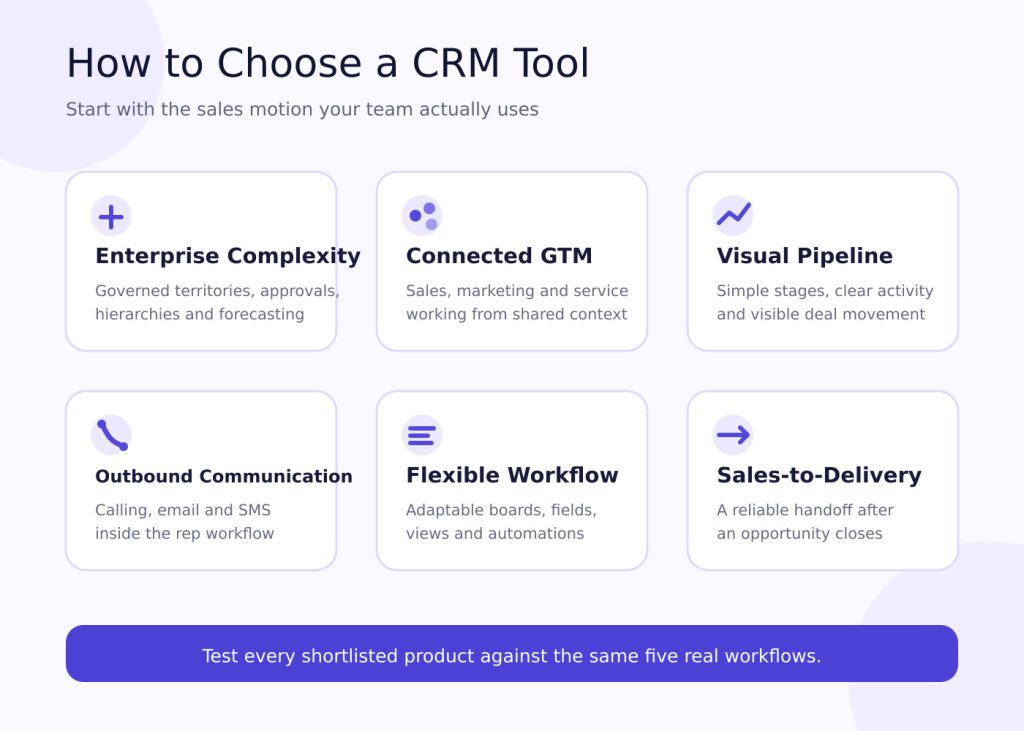
Before you compare demonstrations, agree on what a successful decision should produce. In practice, a shortlist is useful only when every product is tested against the same work. Otherwise, the most polished presentation can appear stronger than the platform that fits your team.
Start with the sales motion
For example, an outbound team’s sales motion may be organised around calls, emails and task queues. In contrast, an enterprise team may require account hierarchies, territories, approvals and forecast governance. Meanwhile, a service business will care about the handoff from sales into project delivery. The correct shortlist begins with how your team sells.
Determine the five most frequent workflows
Test those five workflows in every shortlisted product.
Use realistic records and ask the same people to perform each task. For example, have a rep create a contact, open an opportunity, schedule a follow-up and move the deal to the next stage. Then ask a manager to find the change in a pipeline report. A repeatable test makes the comparison fair.
Separate essentials from attractive extras
Organise features into three categories:
- must-haves (required on day one)
- nice to haves (will be required within the next year)
- optional (useful but not required)
This helps you avoid purchasing a broad suite with all the bells and whistles while missing one essential workflow. A longer feature list cannot compensate for a broken daily process.
Also, ask each stakeholder to explain why a requested capability belongs in its category. A requirement linked to a frequent workflow deserves more weight than a feature that looked impressive in a demonstration. As a result, procurement and operations get a clear record of why the final product was selected.
Calculate total cost of ownership
In addition to seat price include the following costs when evaluating total cost of ownership:
- plan level
- minimum number of seats
- AI/storage/communication usage costs
- add-on costs
- implementation and migration costs
- administrator time costs
- integration software costs
- training and support costs.
First, calculate these costs for the expected team size at the end of the contract, not only the starting headcount. Then check which capabilities require a higher plan. Also confirm whether communication, AI or data usage has separate limits. The least expensive entry plan may not be the least expensive operating model.
Evaluate adoption with real work
When evaluating a new CRM system, do not test only the manager dashboard. Ask an AE to create an opportunity, prepare for a meeting, update a stage, find the last customer interaction and record a next step.
This tests the daily rep workflow. If that workflow is slow, the reporting layer will eventually contain incomplete data.
Next, observe where the rep hesitates, changes screens or copies information manually. Those small points of friction are easy to dismiss during a demonstration. However, they repeat across every active opportunity. Also ask whether automation removes useful judgement or simply removes low-value administration. Adoption is a workflow outcome, not a launch-day promise.
Ensure data quality
Before migration, define mandatory fields, stage-entry criteria, opportunity ownership and duplicate handling. Automation can help capture activity. However, it cannot correct a poorly defined sales process.
Then decide who can create fields, change stages and merge records. In addition, establish a review schedule for duplicates, incomplete opportunities and outdated close dates. These controls do not need to be complicated, but they need an owner. Clear governance keeps flexibility from becoming inconsistency.
Test reporting with real questions
For example, bring the questions managers and reps ask every week. Can they see which deals changed stage? Can they find opportunities without a next step or areas where pipeline coverage is weak? Finally, can they trace a number back to the underlying records? A dashboard is useful only when the team trusts the data and understands its calculation.
Therefore, do not accept a prepared dashboard as proof that reporting will work for your organisation. Instead, build at least one report from your own sample data. Then change a record and confirm that the result updates as expected. The goal is dependable decision support, not attractive charts.
Check the implementation path
Similarly, ask who will configure the platform, migrate the data, train the team and support it after launch. Clarify which work the vendor includes. Also identify work that requires a partner or internal administrator. A capable platform can still fail when ownership is unclear or the implementation plan assumes more time than the team has.
First, define a small release around the workflows that matter most. Add complexity only after the team uses the basic process consistently. A controlled rollout gives you evidence before you commit to more configuration. Moreover, it helps identify whether a problem comes from the technology, process or training.
Review the contract against expected growth
Look beyond the first-year quote. Review renewal terms, seat minimums, storage limits, support levels and the cost of moving into a higher edition. Consider how the platform will handle a larger team, more products, new regions or a more complex approval process.
The objective is not to predict every future requirement. It is to avoid a choice that becomes restrictive as soon as the current sales motion develops. Choose enough flexibility for likely growth without paying for complexity the team cannot use.
CRM tools and Salesman AI: different jobs
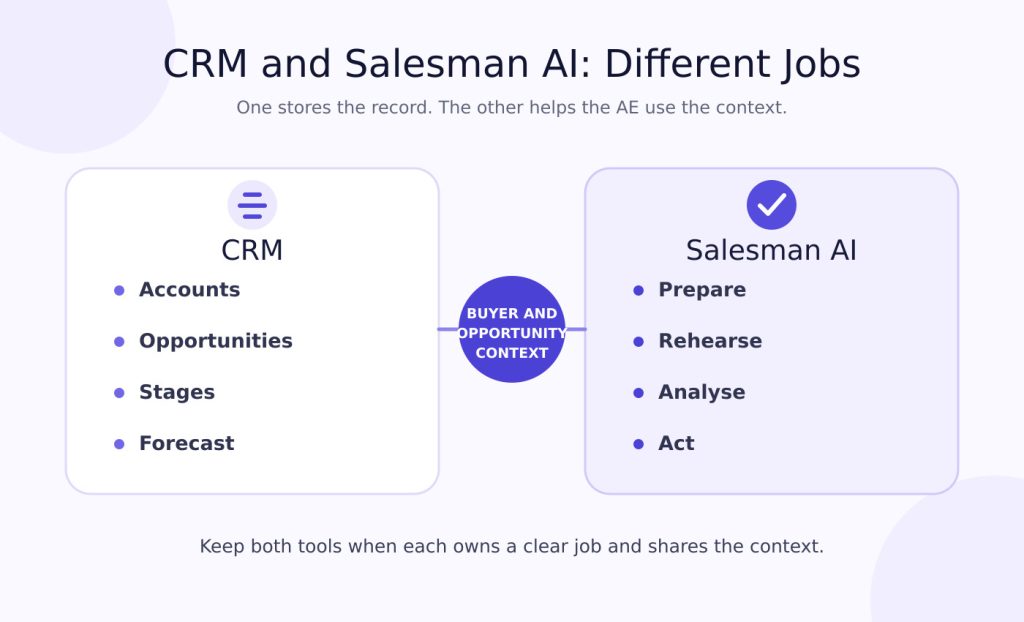
The CRM tracks information about an account, the opportunity, its owner, the current sales stage and its commercial history. Its core job is to maintain the system of record.
Salesman AI supports the salesperson around the customer meeting rather than replacing the CRM.
Before a buyer call, it can provide buyer and opportunity context to help the salesperson prepare. Reps can also use AI Sales Role Play to practise important moments before the meeting.
After the meeting, FOCUS analyses the conversation for priorities, blockers, green flags and evidence supporting the next step. The value comes from turning meeting context into action.
AI Helper gives the salesperson a way to use that context when deciding what to do next.
| CRM | Salesman AI |
|---|---|
| What accounts and opportunities exist? | What matters for the next customer conversation? |
| Who owns the deal, and what stage is it in? | What should the AE prepare, practise or clarify? |
| What structured fields have been recorded? | What evidence appeared in the meeting? |
| What does the pipeline report show? | What should the AE do next? |
This distinction also helps when reviewing your broader sales tech stack. Keep a tool when it owns a clear job and exchanges the necessary context.
CRM implementation checklist
- Establish a defined sales process prior to staging out in CRM.
- Identify an account executive (or similar) to be responsible for governing the CRM.
- Ensure all contacts, accounts and opportunities are clean prior to migrating into the new CRM.
- Determine which fields will be required in CRM and the rationale behind them.
- Document each stage’s entry/exit requirements as they relate to advancing through stages in CRM.
- Link your email, calendar and other key sales tools to CRM.
- Create custom role-based views for account executives, managers and operations personnel.
- Test reports on real opportunity records.
- Educate representatives using their day-to-day workflows.
- After rollout, evaluate CRM adoption and overall data quality.
Frequently asked questions
What are CRM tools?
CRM tools are software platforms that organise prospect and customer data, track sales opportunities and manage activities. They also support reporting, automation and collaboration throughout the customer lifecycle. Their purpose is to give the team a shared, dependable view of the relationship.
What is the best CRM for a small sales team?
HubSpot, Pipedrive, Zoho CRM, Freshsales, Close, monday CRM and Attio are all appropriate CRMs for a small sales team. Your choice depends on your priorities. You may want a free starting point, outbound communications, a visual pipeline or a flexible configuration.
Is there a free CRM for sales teams?
Several CRMs in this guide offer free versions. However, each has limits involving seats, features, records or monthly usage. Before selecting one, confirm that the free version supports the sales team's actual workflow.
What is the difference between a CRM and sales intelligence software?
A CRM stores and organises prospect, customer and opportunity information. Sales intelligence software goes further by providing contacts, buyer signals, conversation insights or recommendations. Most sales teams use both types of solutions because they serve different purposes.
Will Salesman AI replace my CRM?
Salesman AI is an AI sales copilot designed specifically for account executives. It helps them prepare for buyer meetings, rehearse conversations and execute follow-up actions. It can improve how you use CRM context, but it does not replace your CRM.
Choose for the work your team actually does
Best-in-class CRM tools support the sale by making the work easier to complete and understand. Start with your sales motion, required workflows and data governance. Then evaluate the feature set against total cost and rep usability.
After implementing a system of record, examine what happens around the buyer conversation. Look back at your last meeting and consider how Salesman AI can help AEs prepare, practise and respond using customer context. Choose the CRM for the work your team actually does, then add specialist support where the CRM's job ends.