Contents
A pipeline may appear organised, even when deal details remain scattered across phone calls, emails, CRM fields and a representative’s mind. The stage says "proposed", but the economic buyer has not joined. The close date is this month, but the buyer has not confirmed that they are going through procurement. Everything looks trackable, yet the team has no visibility into what actually moves the opportunity forward.
A good deal tracking software solution addresses this challenge. Some systems provide CRM records. Others capture buyer conversations, identify risk, assist with forecasting and help an account executive prepare for the next call.
This guide compares eight viable choices in 2026 based on how well each system fits a specific use case. The best option depends on the gap in your current sales workflow.
TL;DR - The best deal tracking software at a glance
| Tool | Best for | Deal-tracking approach | Pricing status |
|---|---|---|---|
| Salesman AI | AEs managing meeting-driven deals | Buyer, meeting and opportunity context | $29 per user/month; free credits available |
| Salesforce Sales Cloud | Complex enterprise CRM workflows | Opportunity records, automation and forecasting | Starts at $25 per user/month |
| HubSpot Sales Hub | Growing teams wanting an accessible CRM | Deals, contacts, activity and automation | Free CRM; paid editions available |
| Pipedrive | Visual, activity-based pipeline management | Drag-and-drop deals and next activities | Public tiered pricing; 14-day trial |
| Gong | Conversation-led deal intelligence | Interaction capture, risk and pipeline insights | Custom pricing |
| Clari | Enterprise forecasting and inspection | Pipeline health and revenue orchestration | Custom pricing |
| Outreach | Sales execution connected to deal management | Engagement, deal inspection and AI guidance | Custom per-user pricing |
| monday CRM | Flexible no-code sales workflows | Custom pipelines, dashboards and automation | Starts at $10 per user/month |
What is deal tracking software
Deal tracking software gives sales teams visibility into their opportunity pipeline, from qualification to close. In its most basic form, it tracks the deal owner, stage, value, expected close date, contacts and next activity.
Advanced solutions can automatically capture buyer behaviour and conversations, flag risk, show stakeholder engagement, update deal status and support forecasting.
This is why the term can describe several product categories.
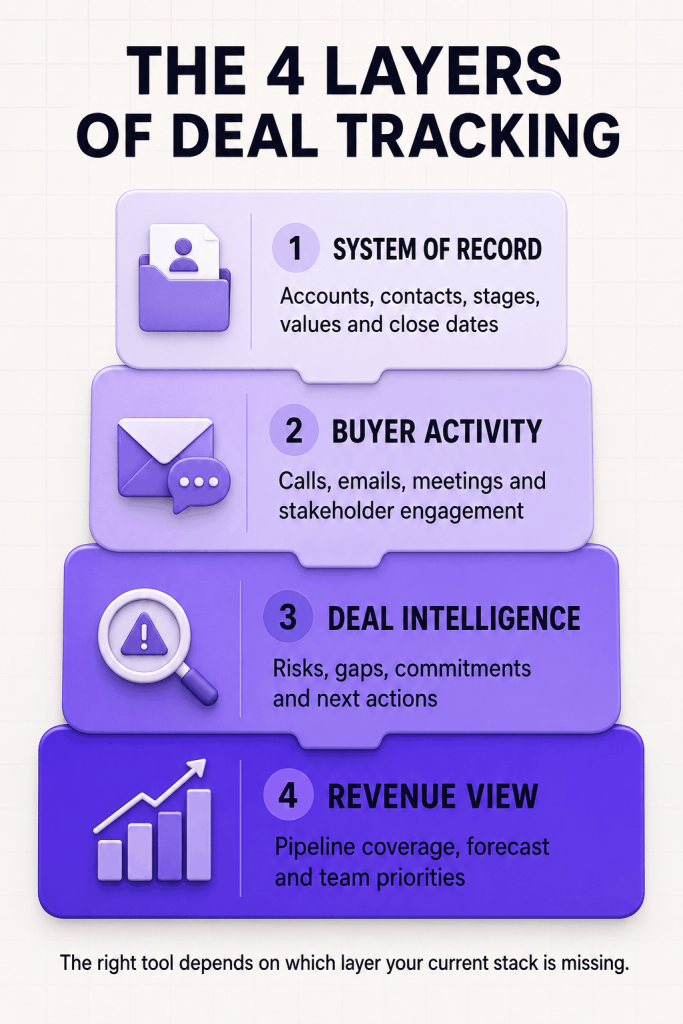
A CRM is usually the system of record, although many CRMs require manual updates. Conversation intelligence shows what buyers are saying, while revenue intelligence combines CRM data and activity to review pipeline health. Rep-first solutions give sellers context before, during and after customer meetings.
The ideal setup is often one CRM plus one specialised intelligence or execution solution. Buying platforms with overlapping functionality only increases cost and duplicate data.
What a healthy deal record should reveal
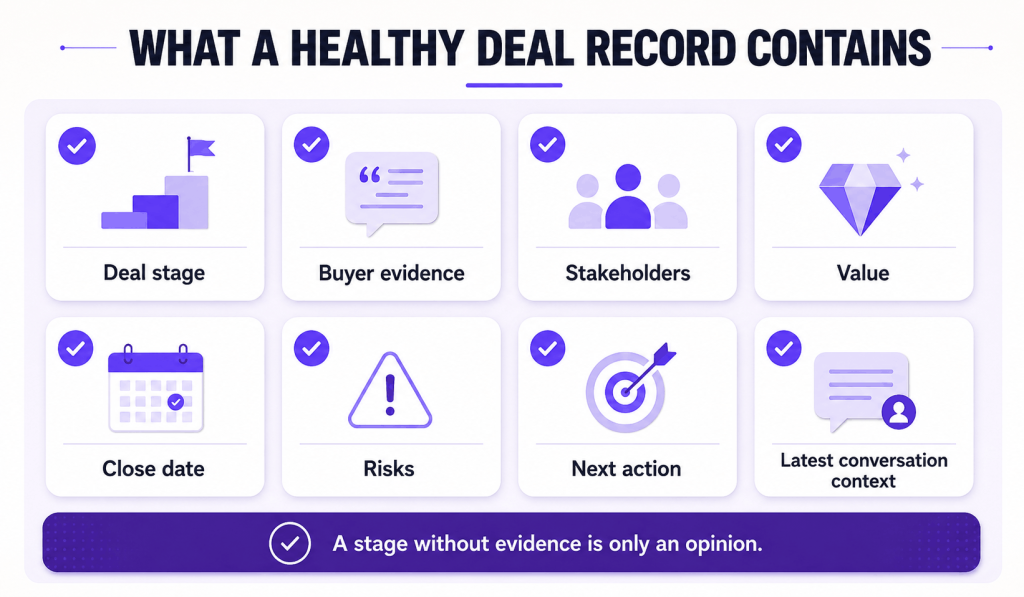
A good deal record needs to answer two questions: “Why does this deal belong here?” and “What do I have to do next?” It should describe the key business issue, important stakeholders, decision process, recent buyer actions, current risks and agreed next step.
The record must distinguish buyer-confirmed details from seller assumptions. An expected close date is weak evidence on its own. It becomes meaningful once the buyer confirms the approval process, procurement process and target outcome.
How we evaluated each tool
Each tool was evaluated using five factors:
- Deal visibility: Can a rep or manager quickly understand the opportunity?
- Data capture: Does it reduce manual updates?
- Risk and next actions: Does it explain what needs attention rather than showing only the stage?
- Workflow fit: Can it integrate with the current CRM and meeting process?
- Usability and value: Is it practical enough for the target team to use regularly?
1. Salesman AI
Salesman AI is the best choice for account executives looking for deal context around customer meetings rather than another manager-first dashboard. It connects preparation, AI rehearsal, meeting analysis, AI sales coaching and follow-through around the same opportunity.
Pre-call notes summarise the buyer’s priorities, likely objections, communication cues and meeting objective. Reps can practise the opportunity using AI rehearsal. After the meeting, the FOCUS Report provides CRM-ready notes, next steps, buyer commitments and follow-up support. AI Helper answers deal-specific questions across connected meetings.
Recommended for: Individual sellers and teams already using a CRM but lacking continuity from meeting to meeting.
Limitations: Salesman AI does not replace a full CRM, enterprise forecasting suite or pipeline database. On-call nudges have been listed as “coming soon” in a recent update.
Pricing: Starts at $29 per user per month with 2,000 monthly AI credits. A one-time allocation of 500 free credits is available without a credit card.
2. Salesforce Sales Cloud
Salesforce Sales Cloud suits companies that need a flexible, large-scale CRM for leads, accounts, contacts and opportunities. Its higher editions add pipeline forecasting and deeper deal insights.
Its biggest advantage is breadth. Organizations can configure opportunity stages, approval processes, fields, permissions and reports for a complex sales cycle.
Recommended for: Mid-sized to large teams with complex processes and a dedicated CRM administrator.
Limitations: Configuration requires more upfront planning than a lightweight pipeline application. Some intelligence and engagement features require additional licences.
Pricing: The Starter edition starts at $25 per user per month. Customers should confirm the edition and add-ons they require.
Verdict: Use Salesforce when you need a company-wide, configurable system of record rather than only a graphical view of deals.
3. HubSpot Sales Hub
HubSpot Sales Hub combines contacts, lead generation, activities, workflows and sales automation within HubSpot’s customer platform. The free version provides an easy transition from spreadsheets to pipeline management.
The free version lets reps track leads, create deals, customise stages, assign tasks and view deal performance. Paid versions add automation, reporting, playbooks and forecasting. It also helps marketing and sales teams share contact history.
Recommended for: Smaller businesses that want one platform for sales and marketing.
Limitations: Permissions, forecasting, automation and reporting depend on the paid tier. Costs can rise as the team adds premium hubs, seats and features.
Pricing: HubSpot provides free CRM and pipeline tracking, while premium Sales Hub editions require paid seats.
Verdict: Use HubSpot when fast adoption and a connected customer record matter more than enterprise-level customisation.
4. Pipedrive
Pipedrive visually tracks the sales process through custom pipeline stages and activities. Reps can enter value, closing probability and expected close date, then move opportunities to the appropriate stage.
The drag-and-drop view shows where opportunities sit, while calls, demos and emails keep the next activity connected to each deal. Custom fields, multiple pipelines, automation and forecasting extend the core CRM.
Ideal for: Small and medium-sized sales organizations that want a straightforward, sales-focused CRM.
Limitations: Organizations with complex cross-department workflows or sophisticated enterprise revenue intelligence needs may outgrow the base CRM. Optional products and higher tiers affect the overall price.
Pricing: Tiered plans and a 14-day free trial are available.
Verdict: Use Pipedrive when reps need a clear way to monitor active opportunities and their next steps.
5. Gong
Gong is a revenue intelligence platform that uses customer interaction signals to establish deal visibility. It captures calls, meetings and emails, then combines those signals with CRM data to evaluate pipeline and identify risk.
Its deal boards can surface missing engagement, changes in buyer language and interaction patterns that static CRM fields may miss. Managers can also use the conversation record for coaching and forecasting.
Ideal for: Enterprise revenue organizations connecting conversation intelligence with deal execution and pipeline visibility.
Limitations: It is typically more expensive than a basic deal tracker and still relies on a connected CRM as the system of record.
Pricing: Custom pricing.
Verdict: Choose Gong when the team needs to understand the buyer conversations behind the CRM stage.
6. Clari
Clari focuses on opportunity inspection, pipeline health and forecasting. Clari Inspect lets leaders and reps see deal health and gaps, helping them prioritize action. Teams can track changes, risks and coverage from one shared view instead of rebuilding reports by hand.
Best for: Enterprise sales and RevOps teams that require forecasting discipline and routine pipeline inspection.
Limitations: It may be too extensive for a small team that only needs contact, stage and activity tracking. Its value depends on clean CRM architecture, consistent usage and aligned processes.
Pricing: Custom pricing.
Verdict: Choose Clari when leadership needs a robust revenue view across deals, teams and forecast cycles.
7. Outreach
Outreach brings sales engagement, deal management, forecasting and coaching into one revenue workflow. Its views let reps and managers assess opportunity data without switching between tabs.
Outreach is most effective for teams that value coordinated engagement and execution. Its Deal Agent recommends opportunity-field updates, creates deal summaries and connects prospecting activity with later-stage management.
Best for: Revenue teams looking for one platform across outreach, deal execution and forecasting.
Limitations: It is more complex than a standalone pipeline tracker. Teams with little focus on post-meeting deal management may not use the full platform.
Pricing: Custom per-user pricing.
Verdict: Use Outreach when sales engagement and proactive deal management need to work in the same execution framework.
8. monday CRM
monday CRM is built on monday.com’s no-code platform, allowing teams to create their own sales pipelines, dashboards, automations and workflows. Teams can adjust boards and stages without building an enterprise-level CRM. Visual features track ownership, status, value, next steps and reporting. It can also connect the sales process with post-sale work when a team already uses monday.com for projects or operations.
Recommended for: Small to mid-sized teams that want flexible workflows and visual collaboration.
Not recommended for: Teams that require strict governance, clear field and stage definitions, or deeper enterprise CRM capabilities.
Pricing: Starts at $10 per user per month for unlimited pipelines. Final pricing depends on the plan and billing conditions.
Verdict: Choose monday CRM when no-code customisation and cross-functional visibility matter more than a prescribed sales process.
How to choose the right deal management software
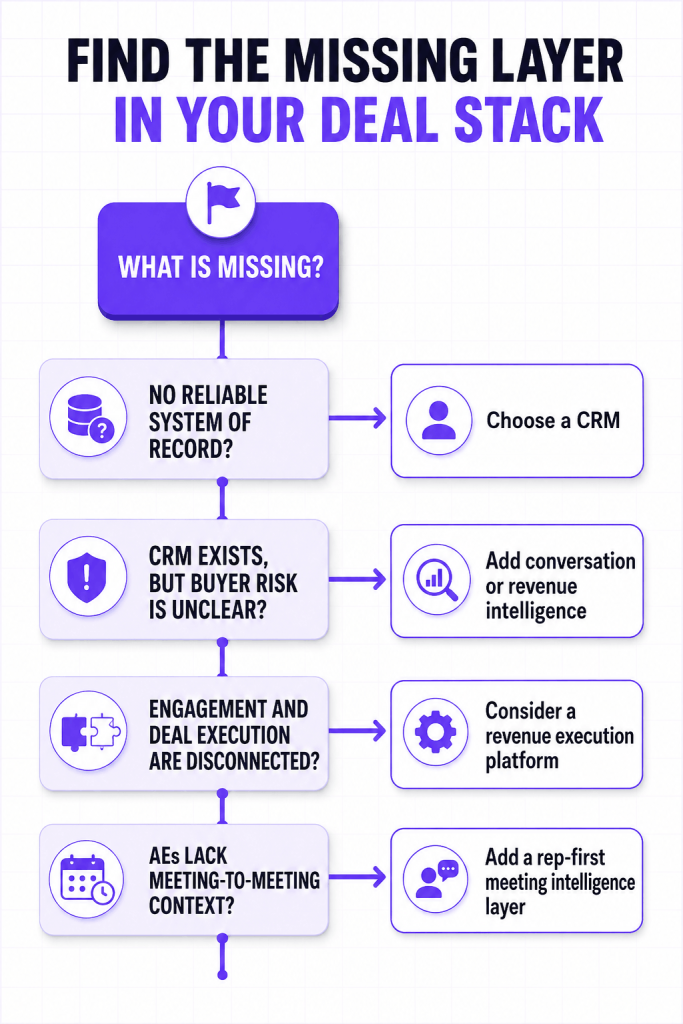
Begin with the most important missing capability, not the longest feature list.
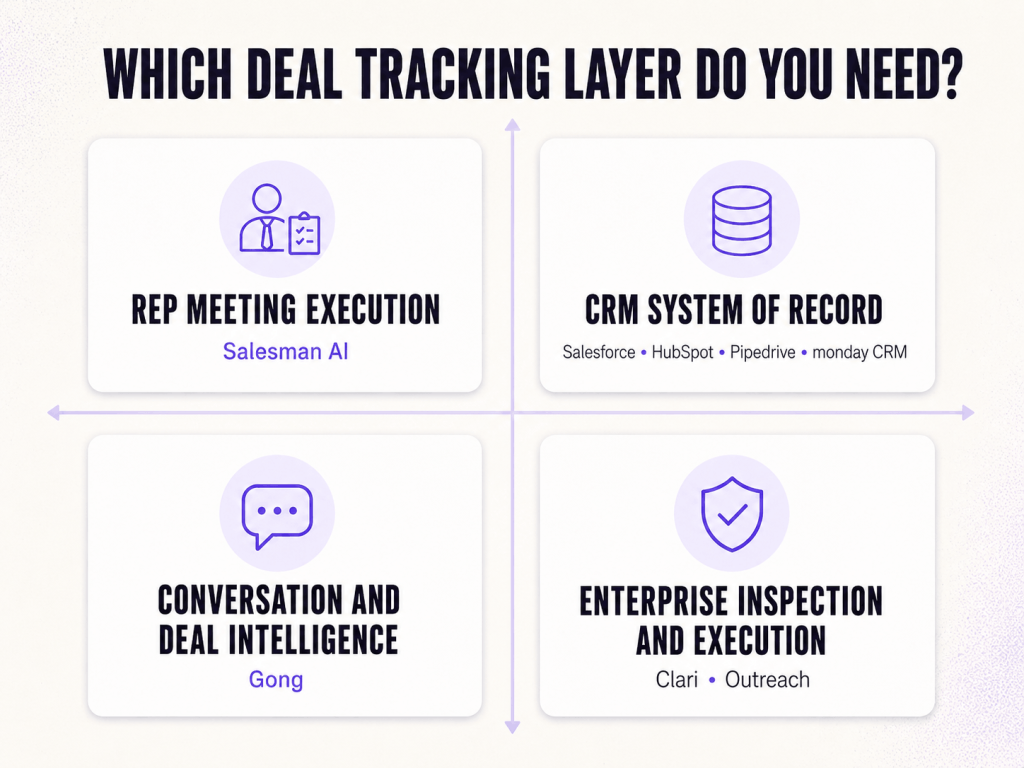
- Use a CRM when information is scattered. If opportunities live in spreadsheets or personal inboxes, consider Salesforce, HubSpot, Pipedrive or monday CRM. The first goal is one place for contacts, stages, values, owners and next actions.
- Add intelligence when buyer evidence or risk is unclear. If the CRM cannot show how buyers are engaging or where risk is developing, review Gong or Clari. Gong focuses more on conversations, while Clari excels at inspection and forecasting.
- Use an execution platform when processes are disconnected. Outreach can connect engagement, deal management and forecasting in a broader seller workflow.
- Add rep-first context when meetings do not build on each other. When a CRM holds the opportunity but does not help AEs prepare, rehearse, interpret meetings and follow up with the same context, Salesman AI may fit the team.
Deal tracking software implementation checklist
Before rolling out deal tracking software, define your sales process:
- Define pipeline stages using buyer evidence, not only seller actions.
- Identify and remove unnecessary fields.
- Name the system of record for each data type.
- Connect email, calendar, meeting tools and the CRM.
- Assign responsibility for maintaining accuracy and updates.
- Create role-specific views for reps, managers and RevOps instead of one generic dashboard.
- Test the workflow with a small group of live deals.
- Measure adoption, missing data, stage ageing and next-action coverage.
Frequently asked questions
What are the best tools for deal tracking?
The right tool depends on the gap you are addressing. HubSpot and Pipedrive offer accessible CRM tracking. Salesforce supports complex enterprise workflows. Gong and Clari add intelligence. Outreach links strategy with execution, monday CRM provides flexibility, and Salesman AI supports meeting-driven AEs.
What should deal tracking software include?
Core capabilities include opportunity stages, values, owners, contacts, close dates, activities and next steps. Advanced tools may also include interaction capture, risk signals, forecasting, workflow automation and buyer-context analysis.
Is deal tracking software the same as a CRM?
Not always. A CRM typically holds account and opportunity data. Conversation intelligence, forecasting and rep-level meeting execution systems can also track deals on top of the CRM.
Can a small business use free deal tracking software?
Yes. HubSpot offers free CRM and pipeline features, and spreadsheets can work at very low volumes. Once multiple people need consistent stage ownership and follow-up visibility, dedicated software becomes more valuable.
How does artificial intelligence improve deal tracking?
AI can capture activity, summarise conversations, recommend updates and identify risk patterns. Its output still depends on reliable source data, clearly defined sales stages and seller judgement.
What metrics should a sales team track?
Stage conversion, stage ageing, win rate, sales-cycle length, forecast accuracy, next-action coverage and stakeholder engagement help teams decide what to do next.
Help the rep move the deal forward
The best deal management system is not always the one with the most dashboards. The best system gives the sales team evidence of buyer intent and shows the rep what to do next.
Choose a CRM if customer information is missing, intelligence if the customer data lacks reliable evidence, and an execution layer if reps need context to act. For AEs who want preparation, practice and follow-through around the same opportunity, start with your next meeting.