Contents
Prospecting was once an endless sea of spreadsheets, 40+ browser tabs and hours of copy-pasting. Then AI came along and said, "I'll make this easier for you."
What did we get? A deluge of emails flooding most people's inboxes, opening with "I noticed you are the Vice President of Sales at [Company]" and going downhill from there.
When done correctly, AI for sales prospecting does something different. It lets you complete the slow work of researching potential customers in minutes, so you can focus on the parts that need a human: deciding which prospects are worth reaching out to, and what to say when you do.
This article follows a six-stage prospecting workflow. Each stage includes a prompt to copy and paste, as well as the types of tools that can perform each job.
TL;DR
The benefits of using AI in prospecting include:
- Research: AI can quickly and efficiently find information on a potential customer.
- Enrichment: AI can add details about a potential customer, such as job function or location.
- Sorting signals: AI can help sort through the large amount of data that comes from prospecting and identify the most promising leads.
- First drafts: AI can help create an initial draft of an email or other message.
But keep these human:
- Judgment: picking the right accounts and knowing when not to send.
- Fact-checking: verify every fact before it goes into a message.
- The handoff: prospecting doesn't end at the booked meeting. The research should carry through to the call.
What is AI for sales prospecting?
AI for sales prospecting means using AI-based tools to find, research, prioritize and contact a target audience. This includes chat assistants such as ChatGPT and Claude, AI features within data platforms, and autonomous AI SDRs. It's one slice of the wider shift toward AI sales automation.
The work remains unchanged. Identifying who the best fit is, understanding why they'd be interested now and deciding what to say are all still necessary.
The only difference is how much time each of those steps takes. Researching an account that once took 20 minutes can now take two, as long as you review the generated output.
Where AI helps in prospecting, and where it doesn't
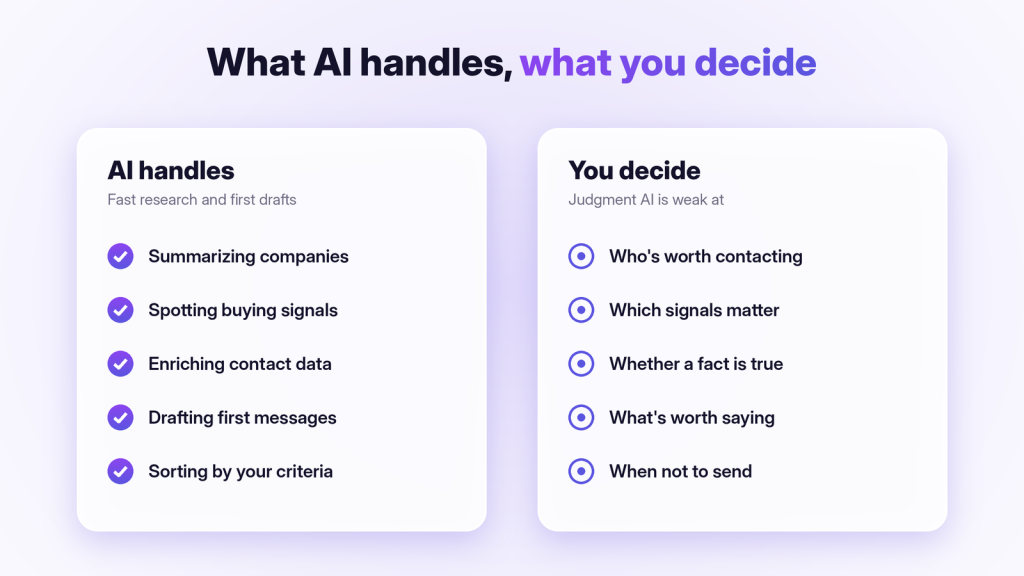
AI won't be equally effective in every part of prospecting. The breakdown is fairly straightforward:
| Prospecting task | How well AI handles it | What you still do |
|---|---|---|
| Summarizing a company | Very well | Check it's current |
| Spotting buying signals | Well, with good data sources | Decide which signals matter for your product |
| Enriching contact data | Well, with a dedicated data tool | Verify emails before sending |
| Prioritizing accounts | Fairly well, if you define the criteria | Set the criteria in the first place |
| Drafting first messages | Fairly well | Rewrite in your own voice |
| Choosing who to contact | Poorly | This is your judgment call |
| Knowing what's true | Poorly without sources | Fact-check anything you'll say out loud |
There's a basic formula. AI is a speedy researcher and can write an acceptable draft quickly. However, it's a poor decision-maker. Build your workflow around this.
How to use AI for sales prospecting: a 6-step workflow
Each step below builds on the last. Run it on 20 accounts before you scale it to 2,000.
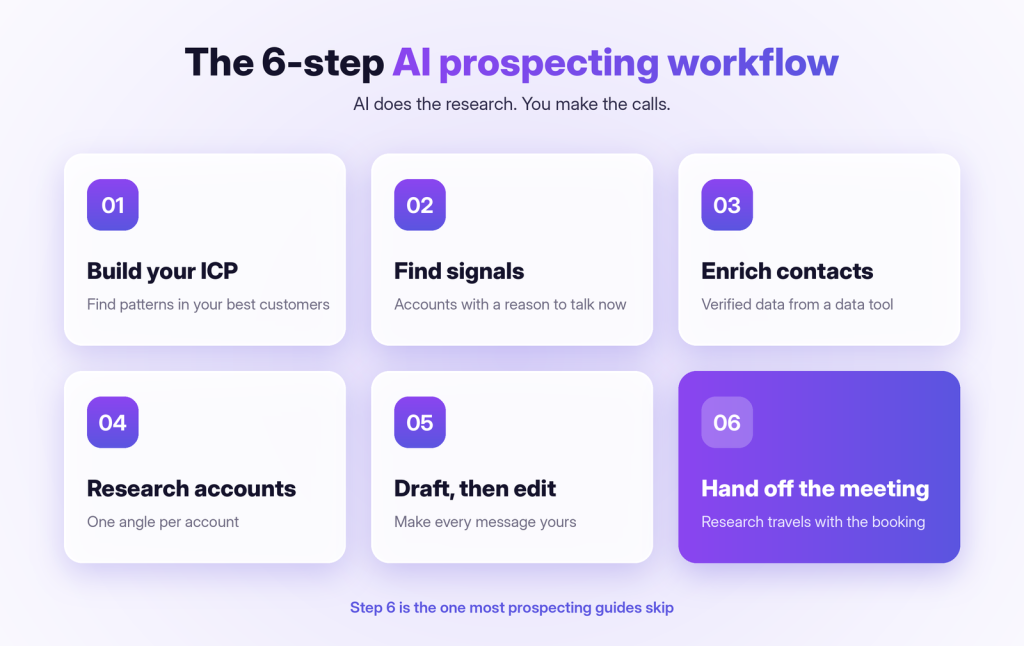
Step 1: Turn your best customers into an ICP
Most prospecting fails before the first email is even sent. The problem lies with an overly broad target list. AI can help by showing patterns in the customer base you've already built.
Identify your most successful customers. Include the company name, industry, business size, what they bought from you and why they bought it. Then ask:
"Here are our 15 best customers with industry, size and the reason they bought: [paste]. What do they have in common? Write an ideal customer profile with firmographics, likely trigger events and the job titles most involved in buying."
Validate: does this ICP match what your AEs hear on their calls? If not, trust your AEs.
Step 2: Find accounts with a reason to talk now
A good-fit company without an immediate need is still just a good fit, not yet a prospect. The key is to look for buying signals.
These can take the form of funding, a change in leadership, new hires (especially several at once), an expanded footprint, or technology changes that touch your solution.
Many data platforms and tools like LinkedIn Sales Navigator will help find these signals for you. Even for a single account, a chat assistant with web search will work too:
"Search for recent news about [Company] from the last six months. List any funding, leadership changes, hiring trends, launches or expansions, with dates and links. Then tell me which of these could make [problem we solve] a priority now."
The last line of that prompt makes a very important point. A signal doesn't matter unless it relates to your solution.
Step 3: Build and enrich the contact list
Next, find the people involved in the purchase decision. For most B2B deals, that's more than one person.
You've got your champion, who will push for the product. Then there's your budget owner, and anyone else who would use the product every day. Reaching all of them is the start of multithreading the deal.
This is where dedicated data tools outshine chat assistants. They pull validated email addresses and phone numbers from various sources. Many of these tools also use waterfall enrichment, which checks multiple data providers until it finds a match.
Don't ask a chatbot for an email address. It may confidently invent some, and bounced email addresses hurt your sending reputation.
Step 4: Research each account in two minutes
For your top account opportunities, determine the "angle": why they'd be interested, in a way that's as specific as possible to both the company and the individual.
"I sell [one-line product description]. Here's what I know about [Company] and [Name, Title]: [paste notes, recent news and their last two LinkedIn posts]. Give me (1) the most likely business priority for this person this quarter, (2) one specific opening angle, and (3) one question that would be worth their time."
For the deeper version of this step, see our 10-minute account research checklist.
Step 5: Draft the first message, then make it yours
AI drafts are a starting point for you to work from. The most common mistake is sending them as is. Give the AI your angle, not just the person's name:
"Write a cold email under 90 words to [Name, Title] at [Company]. Open with this signal: [signal]. Connect it to this problem: [problem]. End with a low-pressure question, not a meeting request. No buzzwords, no flattery and no 'I hope this email finds you well.'"
Then edit it. If this email could be sent to any company in your industry, it isn't personalized enough yet. Need structure ideas? Our sales email templates cover the common formats.
Step 6: Hand off the meeting with the research attached
Most prospecting guides miss this final step. If the prospect says "yes," everything you learned (the signal, the angle, what they said) should carry over into the meeting.
If that doesn't happen, the AE starts discovery from scratch, and the prospect has to explain everything again. That can be a quick way to lose a meeting you worked hard to get. Our discovery call playbook covers what to do once you're in the room.
AI prospecting tools, grouped by the job they do
There's no one-size-fits-all AI prospecting tool. Each tool does a different job, and many teams use two or three.
| Job | Example tools | What AI adds |
|---|---|---|
| Research and drafting | ChatGPT, Claude | Company summaries, angles, first drafts, prompt-based analysis |
| Finding people at target accounts | LinkedIn Sales Navigator | Lead Finder suggests who to contact; Account IQ and Lead IQ summarize accounts and people |
| Contact data and enrichment | Apollo, Clay | Apollo lists 240M+ contacts and an AI research agent; Clay's Claygent researches the web and Clay pulls from 120+ data providers |
| Autonomous outreach | AI SDR tools | Find, contact and book meetings with little human input |
| Meeting prep after the booking | Salesman AI | Briefs the AE on the buyer and the deal before the call |
Comparing the autonomous options? Our guide to AI SDR tools reviews seven of them.
5 mistakes that make AI prospecting backfire
- Volume over relevance. AI makes it cheap to contact thousands of prospects. Inboxes and spam filters notice.
- Trusting unverified facts. A wrong funding round or an old job title in the first line kills credibility.
- "Personalization" that isn't. Bringing up their college or a post they wrote two years ago doesn't show relevance. Connect everything to a business reason.
- No human edit. Prospects will recognize an unedited AI email by the second line.
- Not following data rules. Make sure your data sources and outreach comply with the privacy and email laws in the regions you sell to (e.g., GDPR in Europe and CAN-SPAM in the US).
Where Salesman AI fits in AI prospecting
To clarify up front: Salesman AI is not an outreach or list-building tool. It's a rep-first AI sales copilot that begins where prospecting stops: at the meeting.
It supports you in two areas of the workflow above:
- Step 4, researching a named account. The Salesman AI connector in Claude lets you request a briefing on any company you name, even if it isn't on your calendar yet.
- Step 6, the handoff. After the meeting is scheduled, Pre-Call Notes gives the AE a two-minute summary of the buyer's likely priorities, likely objections, DISC-based communication cues, key questions and the meeting objective. AI Rehearsal lets them practice the discussion with an AI clone of the buyer before the actual meeting.
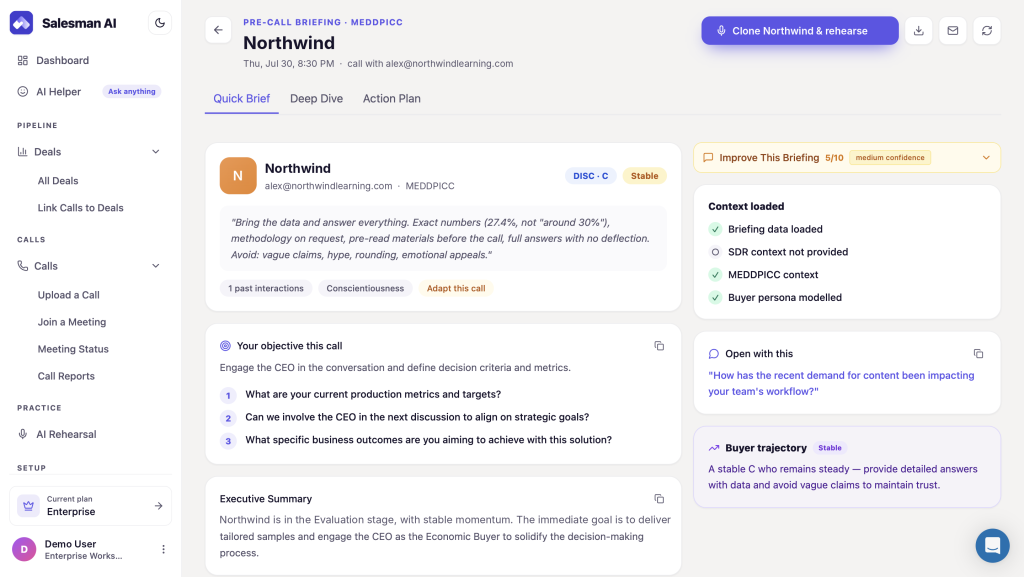
As such, AI prospecting tools get you the meeting. Salesman AI helps make sure the research doesn't stop once the meeting is secured. Start with your next meeting.
FAQs
How do you use AI for sales prospecting?
AI for sales prospecting uses AI to help create an ideal customer profile (ICP), identify buying signals and enrich existing contact information.
The decisions remain human: which contacts to approach, what's accurate and what should be sent.
What are the best AI tools for sales prospecting?
The answer depends on the job you need done. Chat assistants like ChatGPT and Claude help with researching accounts and drafting emails. LinkedIn Sales Navigator helps you find the right people.
Tools such as Apollo and Clay help collect and enrich contact data. AI SDR tools operate independently by running outreach campaigns.
Can ChatGPT find new prospects for me?
Yes, ChatGPT can research and suggest accounts that meet your criteria, especially when web search is enabled. However, it's not a contact database.
Don't use it to get email addresses or phone numbers, because it may invent them.
Is AI prospecting better than manual prospecting?
It's faster at both research and drafting. However, human judgment is still better for choosing target accounts and deciding what's worth saying. The most effective method is combining AI with manual input.
Will AI replace SDRs in prospecting?
AI is taking over much of the repetitive research and outreach work previously assigned to SDRs. People are still needed to set strategy, make judgment calls and hold the conversations.
Rather than eliminating SDRs, many organizations use AI to give each rep access to more opportunities.
Use AI for the research, keep the judgment
AI for sales prospecting is at its strongest as a fast research tool, not a replacement for thinking. Begin with your top customers' profiles and identify real signals to guide your next message.
Then verify what you've found, so you send a message from a human that another human would actually want to read.
Take that research all the way into the meeting. The prospect said yes because something you said was relevant. Make sure the AE knows exactly what that was.