Contents
You have a discovery call at 2:00. It's 1:48. You open the prospect's website, then LinkedIn, then a funding announcement, then somehow their CEO's podcast episode from 2021.
At 1:59 you know a lot of trivia. However, you still don't have a plan.
Good sales account research fixes that. It isn't about knowing everything about a company. Instead, it's about finding the four or five facts that change what you say in the first ten minutes of the call. With a clear process, that takes about ten minutes.
This guide gives you a minute-by-minute checklist, where to look for each item, and how to turn what you find into a one-page call plan. Then it covers how to speed the whole thing up with AI, and which parts Salesman AI can take off your plate.
TL;DR
- Start with your own CRM and past call notes, not Google.
- Look for four things: what they've already told you, what changed at the account, who's on the call, and why now.
- Stop at ten minutes. If a fact won't change a question you ask, skip it.
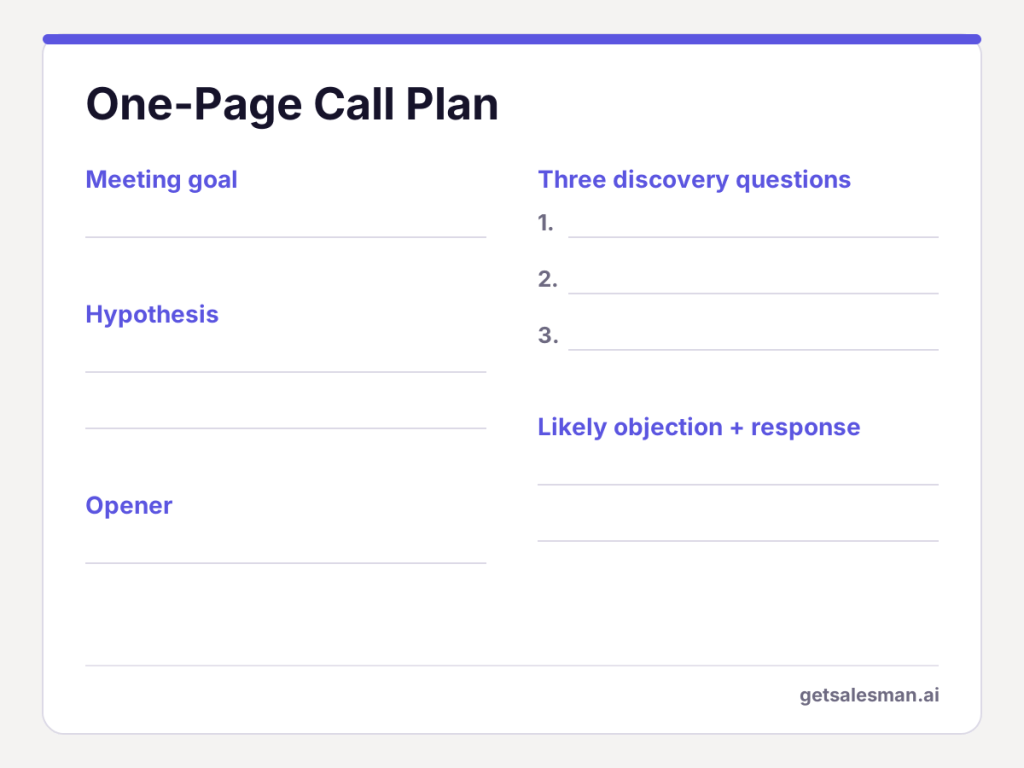
- End with a call plan: a goal, a hypothesis, three questions and one likely objection.
- Scale up for enterprise deals and scale down for a first cold call.
What is sales account research?
Sales account research is when you learn enough about the company and the people on your calls so that you can talk with relevance. That includes the business itself, the things happening in the business recently and the areas where the business is likely to spend money.
It is similar to prospect research. Account research looks at the overall company, while prospect research focuses on the person: their title, how long they've been there and what matters most to them.
Your pre-call process should cover both and connect them to your opportunity.
Most importantly, the output from this effort is not a dossier; it is a much better way to begin a call. Compare these two opening lines:
- "So, tell me a bit about your business."
- "I saw you're hiring six AEs in Austin. Is ramp time for new reps something you're thinking about?"
The first opener requires the buyer to complete your research for you. The second opener shows that you completed the research before calling them.
Why ten minutes is usually enough
Research has very diminishing returns. You get most of the important facts quickly, and after that it is mostly just collecting stuff you will not say out loud.
The other problem is less obvious. Sales strategist David Brock says unfocused research can be used as an excuse to avoid making the call yourself.
Jeb Blount at Sales Gravy also argues against research paralysis before cold calls. If you have ever spent 40 minutes "preparing" for a 30-minute meeting, then you know what I am talking about.
That said, ten minutes is a default, not a law. Enterprise deals with several stakeholders deserve more time, while a first cold call deserves less. You'll find a scaling table further down.
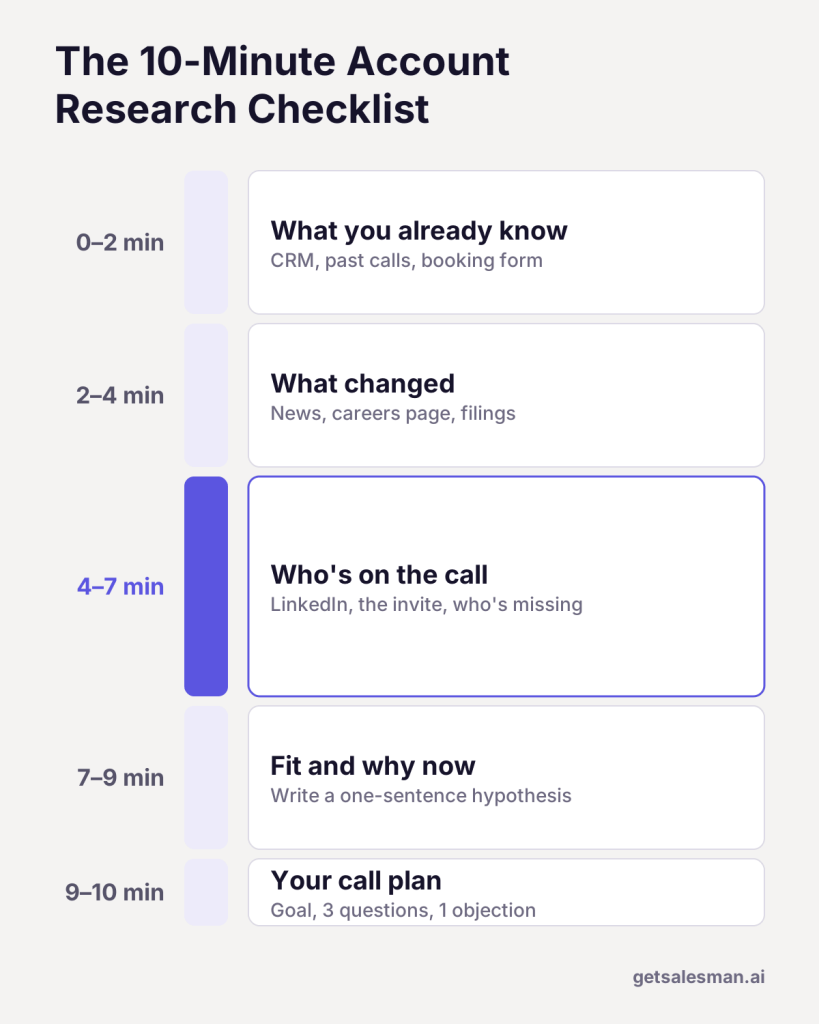
The 10-minute account research checklist
You will run the five blocks in sequence. The last thing each block does is produce something you can document. Research that isn't documented disappears quickly once the buyer joins the call.
| Minutes | What to check | Where to look | What to write down |
|---|---|---|---|
| 0–2 | What you already know | CRM, past call notes, email threads, the booking form | What they told you, open commitments |
| 2–4 | What changed at the account | Newsroom, careers page, LinkedIn company page, filings | One or two trigger events |
| 4–7 | Who's on the call | LinkedIn profiles and posts, the calendar invite | Role, likely priorities, who's missing |
| 7–9 | Fit and why now | Job posts, tech stack lookups, case studies | One-sentence hypothesis |
| 9–10 | Your call plan | Your notes from the steps above | Goal, three questions, one objection |
Minutes 0–2: Start with what you already know
Open your CRM before you open a browser. Internal history will always be better than anything you'll find on an external website.
If the buyer told your colleague about specific problems three months ago, that single note is worth more than one fresh LinkedIn scroll.
Check these quickly:
- Who scheduled the meeting, and what did they say when they scheduled it?
- Have you or anyone in your team ever talked to this account before?
- Are there any open opportunities, past losses or support tickets?
- What did you promise the last time you called them?
You're basically looking for anything the buyer has already said in their own words. Their words make the best discovery questions.
This is the stage where reps most often fail to explore, because the history is spread across recordings, notes and email exchanges.
However, if your meetings run through Salesman AI, you can ask AI Helper a question such as "What did they state about budget last time?" and receive an answer based on all connected meetings.
Minutes 2–4: Find what changed at the account
Next, check for trigger events. These are recent changes that can bring new priorities, new funding or new urgency. For example:
- A new round of funding or an acquisition
- A new leader within the team you want to sell to
- A hiring spree or layoffs
- Any new product, market or region
- Priorities or risks referenced in the last quarterly earnings call or annual report
The careers page is one of the least used resources for finding this information. A job description typically outlines the tools a team has at its disposal and the problem a new employee is expected to solve.
For publicly traded companies, recent filings on SEC EDGAR detail stated priorities and risks.
Minutes 4–7: Research the people on the call
This block takes the most time, and for good reason. Reps typically spend 10 minutes on the company and 30 seconds on the actual person joining the call.
It is the individual who determines whether there are meetings beyond today, not the logo.
For each person on the invite, take note of:
- Role and tenure. A leader who joined less than six months ago is still setting priorities, so they may be more open to change than other leaders.
- Function. A VP of Sales and a VP of Finance at the same company will want different outcomes from these meetings.
- What they post or speak about. Their posts on LinkedIn from the last few days often show what they are focused on this quarter.
- Who is not invited. If the person who controls budget is not on the invite, write that down. You will want to ask about them, and multithreading the deal starts here.
If you choose to use LinkedIn Sales Navigator, it can speed up mapping larger teams. Regardless, regular profile checks cover most first calls.
Minutes 7–9: Form a fit hypothesis
Connect the dots for yourself. What is this company likely using today? What kind of problems can you expect from that? Why will this matter to the buyer now?
Write this as one sentence:
Because [trigger event], [person] is probably dealing with [problem], which affects [outcome they care about].
For example: "Because they're doubling the AE team this year, their sales leader is probably worried about ramp time, which affects whether they hit next year's number."
Treat this as a question to ask on your call, not as an opportunity to sell. If they tell you that you were wrong, that also gives you useful information.
Minutes 9–10: Turn research into a call plan
Lastly, put it all together on one page. In my opinion, this is where most reps go wrong. But it is also where most of your research comes into play.
- Meeting goal: what you want as your next step, for example another call with the budget owner.
- Hypothesis: your one-sentence hypothesis from the previous step.
- Discovery questions: three questions based on three different things you found. You'll find more on writing effective discovery questions in our discovery call playbook and gap selling guide.
- Likely objection: a possible reason they may say no, plus a quick response you are comfortable saying out loud.
- Opener: something from your research that is relevant to the buyer.
Here's a simple test. If your research didn't change anything you wrote on this sheet, it was probably unnecessary.
This sheet is very similar to what you get in a Salesman AI Pre-Call Notes brief. It includes a meeting objective, key questions, an opener and cues on how the buyer prefers to communicate.
What to skip during account research
Most research mistakes come from spending time in the wrong place. Therefore, leave the following out:
- Company history. In almost all cases, how or when a company was founded does not change your discovery questions.
- Every executive profile. Look up the people on the invite, plus the one key person who isn't invited.
- Old news. Anything older than a year is usually background information, not a trigger for your discovery questions.
- The full product catalog. You will want to understand what the company sells, but you don't need to know everything in its catalog.
- Personal details. Their marathon time has nothing to do with this sales conversation. This is a sales call, not a true-crime documentary.
Additionally, there is another common error: not doing any research at all and having the customer recite their entire website back to you. That is going to make you sound like every other rep in their inbox.
How much sales account research does each call need?
Not all meetings require the same amount of preparation. Use this as your starting point, then scale it to fit the deal.
| Call type | Suggested time | Focus on |
|---|---|---|
| First cold call | 2–3 minutes | One trigger event and the person's role |
| Discovery call (SMB or mid-market) | 10 minutes | The full checklist above |
| Enterprise discovery call | 20–30 minutes | Add an org map, annual report themes and strategic initiatives |
| Follow-up meeting | 5 minutes | Last call notes, open commitments and anything that changed since |
| Renewal or expansion call | 10–15 minutes | Usage, support history and new stakeholders |
The follow-up row may look like less effort, but it matters just as much. After the first meeting, your top research resource will not be the web; it will be what the buyer said at your previous meeting.
How to speed up account research with AI
AI assistants such as ChatGPT and Claude are useful for some of the slower parts of public research. They summarize companies, collect current news and draft questions. As a result, the first four minutes of the checklist can shrink to one.
However, two cautions apply. First, chatbots can report incorrect facts, so validate every fact before you say it out loud.
Second, a general chatbot does not know your deal history unless you give that information to the tool. Thus, minutes 0–2 still depend on your CRM and call notes.
If you're comparing options, our roundup of AI sales assistant tools for AEs covers the main choices.
ChatGPT prompts for sales account research
Copy these and insert your own details:
- Company snapshot: "Summarize what [Company] does, who it sells to and how it makes money in five bullets. Link your sources."
- Trigger events: "List notable changes at [Company] in the last six months, such as funding, leadership hires, launches, layoffs or acquisitions. Include dates and links."
- The person: "Here is [Name]'s title and two recent LinkedIn posts: [paste]. What are three business priorities someone in this role likely has this quarter?"
- Hypothesis and questions: "Based on this research [paste] and our product [one line], write a one-sentence hypothesis and three discovery questions for a first call."
- Objections: "What objections might a [title] at a [company type] raise about a tool like ours? Give a short, honest response to each."
The fourth prompt is the most useful. It turns raw research into a call plan, which is the step reps skip more than any other.
How Salesman AI helps with sales account research
Using the checklist is effective. However, doing it manually before each meeting can add up.
Under time pressure before meetings, reps will often skip the internal steps: reviewing past notes, recalling previous commitments and turning research into action.
Salesman AI is a rep-first AI sales copilot designed specifically for Account Executives. It uses the buyer, the meeting and the opportunity as the starting point for each brief, so you never start from a blank page. Below is how that translates to your ten minutes:
| Checklist block | What Salesman AI gives you | What you still do |
|---|---|---|
| 0–2: What you already know | AI Helper answers questions across every connected meeting, and your last FOCUS Report carries over commitments, objections and open questions | Check anything that happened outside connected meetings, such as an email thread |
| 2–4: What changed | – | Scan recent news, the careers page and filings |
| 4–7: Who's on the call | The buyer's likely priorities and DISC-based communication cues | Check who's missing from the invite |
| 7–9: Fit and why now | An executive summary of the deal stage plus likely objections | Test the summary against what you found in the news |
| 9–10: Your call plan | A meeting objective, key questions and a suggested opener | Make the questions sound like you |
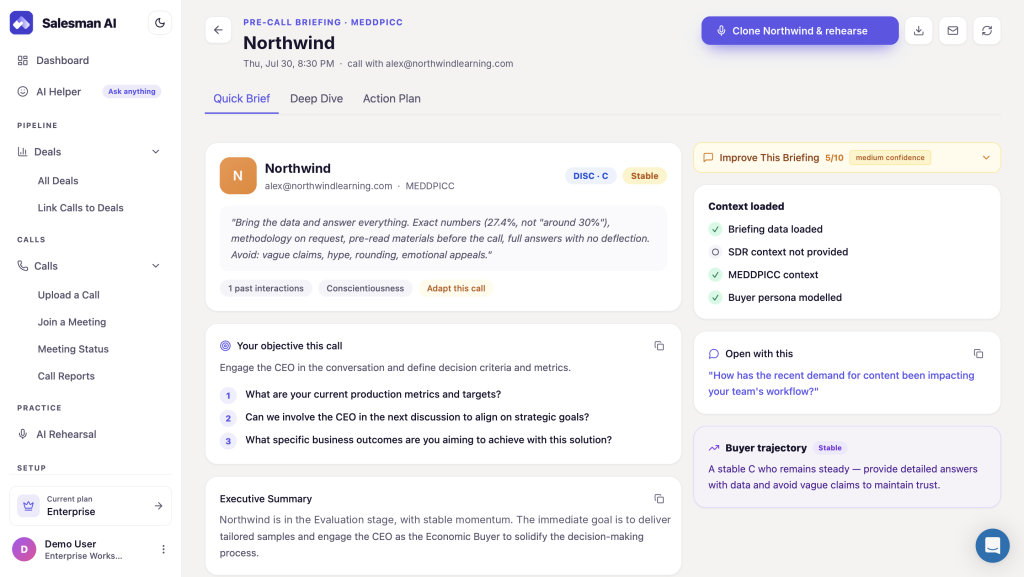
Consider the example above. The brief shows this buyer wants specific numbers, methodology and pre-call reading materials, and loses trust when claims are vague. That significantly changes how you open, how you answer questions and what you prepare before the meeting.
Additionally, a 10-minute scan through LinkedIn is unlikely to give you insights this detailed.
Rehearse the conversation, not just the content
Your research tells you what to say. Your rehearsal tells you whether you can say it when the buyer pushes back.
From the same brief, AI Rehearsal lets you practice your responses with an AI version of your customer, built from the context of the opportunity. If you're weighing options, see our comparison of AI sales role-play tools.
After the call, your next round of research is half done
When the meeting ends, the FOCUS Report captures CRM-ready notes on what was discussed, commitments from the buyer, the agreed next actions and a plan to move the opportunity forward. It also gives you a head start on your sales follow-up email.
This information becomes the "what you already know" step at the start of your next meeting with the same account. Therefore, prep gets easier each time you speak with that buyer.
On-Call Nudges, which will give reps private, real-time prompts during the call, are coming soon.
One honest caveat: a brief is a starting point, not a script. Read it, check one or two things yourself and then ask the questions in your own words.
If you'd rather spend your ten minutes checking a brief than building one, start with your next meeting.
FAQs
How long does sales account research take in B2B?
Typically, about 10 minutes is enough for most discovery calls if you follow a set order. A first cold call needs 2–3 minutes of research, while enterprise deals may need 20–30 minutes, depending on the number of stakeholders involved.
What's the difference between account research and prospect research?
Account research examines the company: its business model, recent developments and current priorities. Prospect research examines the person: their job title, tenure and probable objectives. A good pre-call process examines both.
What should I research before a sales call?
First, go back into your CRM and review anything you've documented about this contact. Next, check for recent trigger events. Then look up everyone on the invite (use LinkedIn) and develop a hypothesis about why they would care now.
What tools help with account research for sales calls?
Start with your CRM and notes from previous calls. Beyond that, use the company's newsroom and careers page, LinkedIn, Sales Navigator, public filings and an AI assistant. Tools like Salesman AI build a brief from your buyer, meeting and opportunity history.
Can I automate account research before sales outreach?
In some cases, yes. AI assistants can provide quick summaries of publicly available information, and automated tools can assemble a brief. However, you still need to verify the information and decide which parts are relevant to your deal.
Will Salesman AI do my account research for me?
It does much of it. Before each meeting, Pre-Call Notes gives you a two-minute brief compiled from your buyer, meeting and opportunity details. The brief covers likely priorities for the buyer's role, objections, communication cues, key questions and a meeting objective. You should still review recent news and check who else was invited.
What ChatGPT prompts work for sales account research?
The most useful prompts ask for a company snapshot, recent trigger events, likely priorities for the buyer's role, and a hypothesis with three discovery questions. See the five prompts above.
Do less research, but do the right research
In good sales account research, the number of tabs you opened doesn't matter. What matters is whether your first question lands.
Therefore, start with what the buyer has already told you. Look at what changed. Research the people involved, write a one-page plan and then stop.
Ten minutes, five blocks, one plan. That's it. Your next discovery call won't feel like another cold open so much as a second conversation.